

ASUS P8P67-M PRO Micro ATX P67 Motherboard Review
...สวัสดีครับ สำหรับกระแส Sandy Bridge ช่วงนี้ที่กำลังมาแรง ทางเรา Vmodtech.com ก็ขอเกาะกระแสความแรงนี้ไปเรื่อยๆนะครับ โดยในวันนี้สำหรับมาเธอร์บอร์ดลำดับที่ 11 ที่ทางเรานำมาทดสอบรีวิวกันแบบเต็มๆ ก็จะมาจากทาง ASUS กันอีกแล้วนะครับ แต่ในคราวนี้จะมากันในขนาดที่เล็กกระทัดรัด ราคาก็ประหยัด แถมยังลากกันได้กระจายอีกต่างหาก โดยมาเธอร์บอร์ดรุ่นนี้จะมากันในชื่อรุ่น ASUS P8P67-M PRO ซึ่งก่อนอื่นเราไปชมสเป็คต่างๆของตัวมาเธอร์บอร์ดตัวนี้กันก่อนนะครับ

Overview
LGA1155 socket for Intel® Second Generation Core™ i7/ Core™ i5/ Core™ i3 Processors
 This motherboard supports the Intel® second generation Core™ i7 / Core™ i5 / Core™ i3 processors in LGA1155 package with memory and PCI Express controllers integrated to support 2-channel (4 DIMMs) DDR3 memory and 16 PCI Express 2.0 lanes. This provides great graphics performance. Intel® second generation Core™ i7 / Core™ i5 / Core™ i3 processors are among the most powerful and energy efficient CPUs in the world.
Intel® P67 Express Chipset
 The Intel® P67 Express Chipset is the latest single-chipset designto support the new 1155 socket Intel® Core™ i7 / Core™ i5 / Core™ i3 second generation processors. It uses serial point-to-point links, which allows increased bandwidth and stability, and provides an improved performance. It also provides two SATA 6.0 Gb/s and four SATA 3.0 Gb/s ports for faster data retrieval at double the bandwidth of current bus systems.
Dual-Channel DDR3 2200(O.C.) / 2133(O.C.) / 1866(O.C.) / 1600(O.C.) / 1333 / 1066MHz support
The motherboard supports DDR3 memory that features data transfer rates of 2200(O.C.) / 2133(O.C.) / 1866(O.C.) / 1600(O.C.) / 1333 / 1066 MHz to meet the higher bandwidth requirements of the latest 3D graphics, multimedia, and Internet applications. The dual-channel DDR3 architecture enlarges the bandwidth of your system memory to boost system performance.Quad-GPU SLI and Quad-GPU CrossFireX Support!

 Flexible Multi-GPU solutions, Your Weapon of Choice!
P8P67-M PRO brings multi-GPU configurations through both SLI™ and CrossFireX. This motherboard features the powerful Intel® P67 platform, optimizing PCIe allocation in multiple GPU setups. Expect a brand new gaming sensation like you’ve never experienced before!
Flexible Multi-GPU solutions, Your Weapon of Choice!
P8P67-M PRO brings multi-GPU configurations through both SLI™ and CrossFireX. This motherboard features the powerful Intel® P67 platform, optimizing PCIe allocation in multiple GPU setups. Expect a brand new gaming sensation like you’ve never experienced before!TPU
 Unleash your performance with ASUS’ simple onboard switch or AI Suite II utility. ASUS Auto tuning feature can intelligently optimize the system for fast, yet stable clock speeds, and the TurboV gives you the freedom to adjust CPU frequencies and ratios to optimize performance under varied system conditions.

EPU
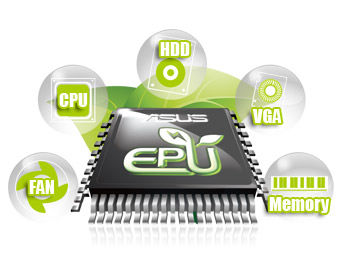
 Tap into the world’s first real time PC power saving engine through a simple onboard switch or AI Suite II utility. Get total system power savings by automatically detecting current PC loadings and intelligently moderating power consumption. This also reduces fan noise and extends component longevity.

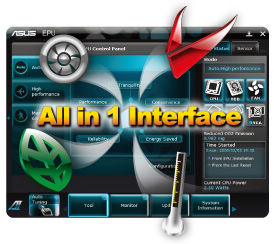
AI Suite II
 With its fast user-friendly interface, ASUS AI Suite II consolidates all the exclusive ASUS features into one simple to use software package. It allows you to supervise overclocking, energy management, fan speed control, voltage and sensor readings. This all-in-one software offers diverse and ease to use functions, with no need to switch back and forth between different utilities.
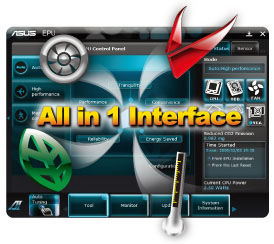
Auto Tuning
 Auto Tuning is an intelligent tool that automates overclocking to achieve a total system level up. This tool also provides stability testing. Even O.C. beginners can achieve extreme yet stable overclocking results with Auto Tuning!

TurboV
 Easy, Real-Time O.C. Tunings
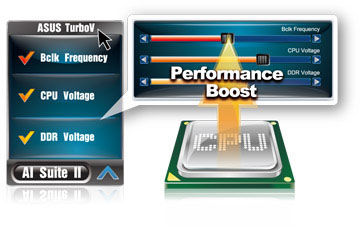
Feel the adrenaline rush of real-time OC-now a reality with the ASUS TurboV. This easy OC tool allows you to overclock without exiting or rebooting the OS; and its user-friendly interface makes overclock with just a few clicks away. Moreover, the ASUS OC profiles in TurboV provides the best O.C. settings in different scenarios.
Easy, Real-Time O.C. Tunings
Feel the adrenaline rush of real-time OC-now a reality with the ASUS TurboV. This easy OC tool allows you to overclock without exiting or rebooting the OS; and its user-friendly interface makes overclock with just a few clicks away. Moreover, the ASUS OC profiles in TurboV provides the best O.C. settings in different scenarios.
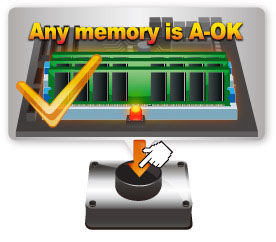
MemOK!
 Any Memory is A-OK!
MemOK! quickly ensures memory boot compatibility. This remarkable memory rescue tool requires a mere push of the button to patch memory issues. MemOK! determines failsafe settings and dramatically improves your system boot success. Get your system up and running in no time.
Any Memory is A-OK!
MemOK! quickly ensures memory boot compatibility. This remarkable memory rescue tool requires a mere push of the button to patch memory issues. MemOK! determines failsafe settings and dramatically improves your system boot success. Get your system up and running in no time.
Anti-Surge Protection
 This special design prevents expensive devices and the motherboard from damage caused by power surges from switching power supply (PSU).
100% All High-quality Conductive Polymer Capacitors
 This motherboard uses all high-quality conductive polymer capacitors for durability, improved lifespan, and enhanced thermal capacity.
Fanless Design: stylish heatsink solution
 The Wing Heatsink features a 0-dB thermal solution that offers users a noiseless PC environment. The beautifully curved fins not only upgrade the visual enjoyment for motherboard users, but also effectively cools down hot airflows generated by the northbridge chipset. Combined with usability and aesthetics, the ASUS Wing Heatsink will give users an extremely silent and cooling experience with the elegant appearance!
Fan Xpert
 Active Quiet & Cool
ASUS Fan Xpert intelligently allows users to adjust both the CPU and chassis fan speed according to different ambient temperature , which is caused by different climate conditions in different geographic regions and system loading.Built-in variety of useful profiles offer flexible controls of fan speed to achieve a quiet and cool environment.
Active Quiet & Cool
ASUS Fan Xpert intelligently allows users to adjust both the CPU and chassis fan speed according to different ambient temperature , which is caused by different climate conditions in different geographic regions and system loading.Built-in variety of useful profiles offer flexible controls of fan speed to achieve a quiet and cool environment.True Serial ATA 6Gb/s support
 The Intel® P67 Express Chipset natively supports the Serial ATA (SATA) interface, delivering up to 6.0 Gb/s data transfer. ASUS provides extra SATA 6.0 Gb/s ports with enhanced scalability, faster data retrieval, and double the bandwidth of current bus systems.
USB 3.0 support
 Experience ultra-fast data transfer at 4.8Gbps with USB 3.0 – the latest connectivity standard. Built to connect easily with next-generation components and peripherals, USB 3.0 transfers data 10 times faster and is also backward compatible with USB 2.0 components.
S/PDIF out connector at the back I/O
 This motherboard provides convenient connectivity to external home theater audio systems via the optical S/PDIF (SONY-PHILIPS Digital Interface) out connecor at the back I/O. The S/PDIF transfers digital audio without converting it to analog format and keeps the best signal quality.
8-channel high definition audio
The onboard 8-channel HD audio (High Definition Audio, previously codenamed Azalia) CODEC enables high-quality 192KHz/24-bit audio output and jack-detect feature that automatically detects and identifies what types of peripherals are plugged into the audio I/O jacks and notifies users of inappropriate connection, which means there will be no more confusion of Line-in, Line-out, and Mic jacks.EFI BIOS (EZ Mode)
 Flexible & Easy BIOS Interface
The new ASUS EFI BIOS is an Extensible Firmware Interface that complies with uEFI architecture, offering a user-friendly interface that goes beyond traditional keyboard-only BIOS controls to enable more flexible and convenient mouse input. Users can easily navigate the new EFI BIOS with the same smoothness as their operating system. The exclusive EZ Mode displays frequently-accessed setup info, while the Advanced Mode is for experienced performance enthusiasts that demand far more intricate system settings.
Flexible & Easy BIOS Interface
The new ASUS EFI BIOS is an Extensible Firmware Interface that complies with uEFI architecture, offering a user-friendly interface that goes beyond traditional keyboard-only BIOS controls to enable more flexible and convenient mouse input. Users can easily navigate the new EFI BIOS with the same smoothness as their operating system. The exclusive EZ Mode displays frequently-accessed setup info, while the Advanced Mode is for experienced performance enthusiasts that demand far more intricate system settings.
- EZ Mode - easy to learn, use, and manage
- Advanced Mode - for experienced performance enthusiasts that demand intricate system settings

.
Specifications
| CPU | Intel® Socket 1155 for Intel® 2nd Generation Core™ i7 Processor/Core™ i5 Processor/Core™ i3 Processor/ Support Enhanced Intel SpeedStep Technology (EIST) Supports Intel® Turbo Boost Technology 2.0 * The Intel® Turbo Boost technology 2.0 support depends on the CPU types * Refer to www.asus.com for Intel® CPU support list. |
| Chipset | Intel® P67 Express Chipset |
| Memory | 4 x DIMM, Max. 32 GB, DDR3 2200(O.C.)*/2133(O.C.)*/1866(O.C.)/1600(O.C.)/1333/1066 Non-ECC,Un-buffered Memory Dual Channel memory architecture * According to Intel® SPEC, the Max. 32GB memory capacity can be supported with DIMMs of 8GB (or above). ASUS will update QVL once the DIMMs are available on the market. * Hyper DIMM support is subject to the physical characteristics of individual CPUs. Some hyper DIMMs only support one DIMM per channel. Please refer to Memory QVL for details. * Due to CPU behavior, DDR3 2200/2000/1800 MHz memory module will run at DDR3 2133/1866/1600 MHz frequency as default. |
| Expansion Slots | 2 x PCIe 2.0 x16 slots (Single@x16 or dual@x8/x8 mode or dual@x16/x1 mode) 1 x PCIe 2.0 x16 slot (black, max.@x4 mode, compatible with PCIe x 1 and x4 devices) 1 x PCIe 2.0 x1 slot |
| Storage | Intel® P67 Express Chipset 4 xSATA 3.0 Gb/s ports (blue) 2 xSATA 6.0 Gb/s ports (gray) Intel Rapid Storage Technology Support RAID 0,1,5,10 Marvell® PCIe SATA 6Gb/s controller 1 xExternal SATA 6.0 Gb/s port 1 xSATA 6.0 Gb/s port (navy blue) |
| LAN | Realtek® RTL8111E Gigabit LAN controller |
| Audio | Realtek® ALC892 8-Channel Audio CODEC supports DTS Surround Sensation UltraPC - Optical S/PDIF Out port at back I/O - Supports Jack-Detection, Multi-streaming, Front Panel Jack-Retasking(HD only) |
| IEEE 1394 | VT6315N controller supports 2 x 1394a port(s) (1 port at mid-board, 1 port at back panel) |
| USB | Chipset built-in - 2 x USB 3.0/2.0 ports (blue, at back panel) Chipset built-in - 14 x USB 2.0/1.1 ports (8 ports at mid-board, 6 ports at back panel) |
| ASUS Unique Features | - 100% All High-quality Conductive Polymer Capacitors - TPU - ASUS Turbo V - Auto Tuning - Anti-Surge Protction - Mem OK! - ASUS EPU - CrossFireX Support - SLI Support - Protect 3.0 - AI Suite II - ASUS CrashFree BIOS 3 - ASUS EZ Flash 2 - ASUS MyLogo 2 |
| Overclocking Features | SFS (Stepless Frequency Selection) - Internal Base Clock tuning from 80MHz up to 300MHz at 1MHz increment Overclocking Protection - ASUS C.P.R.(CPU Parameter Recall) |
| Back Panel I/O Ports | 1 x PS/2 Mouse 1 x PS/2 Keyboard 1 x External SATA 1 x IEEE 1394a 1 x LAN(RJ45) port(s) 2 x USB 3.0/2.0 6 x USB 2.0/1.1 1 x S/PDIF Out (Optical) 8 -Channel Audio I/O |
| Internal I/O Connectors | 4 x USB connectors support additional 8 USB ports 1 x MemOK! Button 1 x TPM connector 3 x SATA 6.0Gb/s connectors 4 x SATA 3.0Gb/s connectors 1 x IEEE 1394a connector 1 x CPU Fan connector(s) 2 x Chassis Fan connector(s) 1 x Power Fan connector(s) 1 x LPT connector 1 x TPU switch 1 x S/PDIF Out connector 1 x 24-pin ATX Power connector 1 x 8-pin ATX 12V Power connector 1 x Front panel audio connector 1 x COM connector 1 x System Panel connector |
| BIOS | 32 Mb Flash ROM , EFI AMI BIOS, PnP, DMI2.0, WfM2.0, ACPI v2.0a, SM BIOS v2.6, Multi-language BIOS |
| Accessories | User's manual 2 x SATA 3.0Gb/s cables 2 x SATA 6.0Gb/s cables 1 x Q-Shield 1 x Q-Connecor (retail version only) |
| Support Disc | Drivers Anti-virus software (OEM version) ASUS Update ASUS Utilities Support DVD |
| Form Factor | uATX Form Factor 9.6 inch x 9.6 inch ( 24.4 cm x 24.4 cm ) |
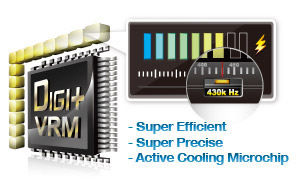
 Digital Power Design: The New Standard
The world’s first Dual Intelligent Processors from ASUS pioneered the use of two onboard chips - EPU (Energy Processing Unit) and TPU (TurboV Processing Unit). New generation Dual Intelligent Processors 2 with DIGI+ VRM digital power design launch control into a new era.
The digital architecture delivers twice the precision power, intelligently adjusting PWM voltage and frequency modulation with minimal power loss through BIOS tuning and an exclusive user interface to increase the board’s overclocking range while performance reaches its full potential. It also adjusts VRM frequencies dynamically, cutting radiation interference by half and decreasing Vcore power noise for CPU to enhance system stability through enabling VRM spread spectrum. ASUS DIGI+ VRM digital power design empowers users with superior flexibility and perfect precision to ensure optimized performance, extreme system stability and greater power efficiency.
Digital Power Design: The New Standard
The world’s first Dual Intelligent Processors from ASUS pioneered the use of two onboard chips - EPU (Energy Processing Unit) and TPU (TurboV Processing Unit). New generation Dual Intelligent Processors 2 with DIGI+ VRM digital power design launch control into a new era.
The digital architecture delivers twice the precision power, intelligently adjusting PWM voltage and frequency modulation with minimal power loss through BIOS tuning and an exclusive user interface to increase the board’s overclocking range while performance reaches its full potential. It also adjusts VRM frequencies dynamically, cutting radiation interference by half and decreasing Vcore power noise for CPU to enhance system stability through enabling VRM spread spectrum. ASUS DIGI+ VRM digital power design empowers users with superior flexibility and perfect precision to ensure optimized performance, extreme system stability and greater power efficiency.

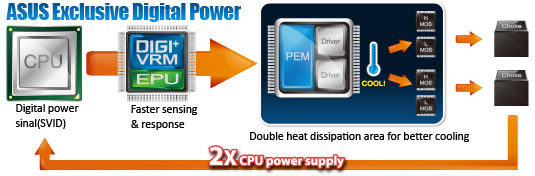 Faster sensing and response: ASUS DIGI+ VRM acts as a digital controller to perfectly match digital power signal (SVID) requests from the CPU, eliminating digital-to-analog conversion lag.
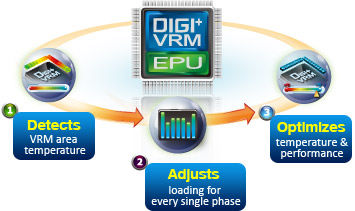 2X CPU power supply: the same exclusive dual driver and MOS design also provides twice the CPU power supply with two complete power stages. This results in far greater phase load tolerances, so the CPU never has to wait for power to arrive, increasing performance and overclocking potential.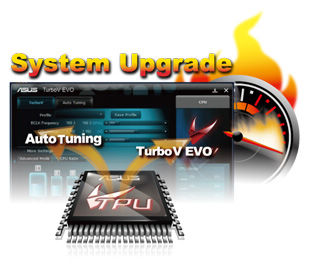
 Diverse BT Enjoyment, New Technology Lifestyle
Onboard Bluetooth wireless design enables smart connectivity to Bluetooth devices with no additional adapter. ASUS BT GO! comes with 7 special functions that offer a significant breakthrough in Bluetooth evolution, including Folder Sync, BT Transfer, BT Turbo Remote, BT-to-Net, Music Player, Shot and Send, and Personal Manager. All are accessible through the exclusive, user-friendly ASUS interface.
Diverse BT Enjoyment, New Technology Lifestyle
Onboard Bluetooth wireless design enables smart connectivity to Bluetooth devices with no additional adapter. ASUS BT GO! comes with 7 special functions that offer a significant breakthrough in Bluetooth evolution, including Folder Sync, BT Transfer, BT Turbo Remote, BT-to-Net, Music Player, Shot and Send, and Personal Manager. All are accessible through the exclusive, user-friendly ASUS interface.


 Double USB Access, Double Convenience
ASUS facilitates strategic USB 3.0 accessibility for both the front and rear panels - 4 USB 3.0 ports in total. Experience the latest plug & play connectivity at speeds up to 10 times faster than USB 2.0. The P8P67 affords greater convenience with high speed connectivity.
Double USB Access, Double Convenience
ASUS facilitates strategic USB 3.0 accessibility for both the front and rear panels - 4 USB 3.0 ports in total. Experience the latest plug & play connectivity at speeds up to 10 times faster than USB 2.0. The P8P67 affords greater convenience with high speed connectivity.

 Extra Ports, Extra Speed and Accessibility
The Intel® P67 Express chipset natively supports the next-generation Serial ATA (SATA) interface, delivering up to 6Gb/s data transfers. ASUS provides extra SATA 6Gb/s ports with enhanced scalability, faster data retrieval and double the bandwidth of current bus systems.
Extra Ports, Extra Speed and Accessibility
The Intel® P67 Express chipset natively supports the next-generation Serial ATA (SATA) interface, delivering up to 6Gb/s data transfers. ASUS provides extra SATA 6Gb/s ports with enhanced scalability, faster data retrieval and double the bandwidth of current bus systems.

 DTS Surround Sensation UltraPC
 delivers exceptional 5.1 surround experience through the most common PC audio setups - your existing stereo speakers or headphones. In addition to virtual surround, “Bass enhancement” provides stronger low frequency bass sound, and “Voice clarification” provides clear human dialogue even with loud background sound. With these technologies, you may experience a better home-theater audio with ease.
DTS Surround Sensation UltraPC
DTS Surround Sensation UltraPC delivers exceptional 5.1 surround experience through the most common PC audio setups - your existing stereo speakers or headphones. In addition to virtual surround, “Bass enhancement” provides stronger low frequency bass sound, and “Voice clarification” provides clear human dialogue even with loud background sound. With these technologies, you may experience a better home-theater audio with ease. DIY Quickly, DIY Easily!
ASUS Q-Design enhances your DIY experience. All of Q-LED, Q-Slot and Q-DIMM design speed up and simplify the DIY process!
DIY Quickly, DIY Easily!
ASUS Q-Design enhances your DIY experience. All of Q-LED, Q-Slot and Q-DIMM design speed up and simplify the DIY process! The motherboard is European Union´s Energy-related Products (ErP) ready, and ErP requires products to meet certain energy efficiency requirements in regards to energy consumptions. This is in line with ASUS vision of creating environment-friendly and energy-efficient products through product design and innovation to reduce carbon footprint of the product and thus mitigate environmental impacts.


- All specifications are subject to change without notice. Please check with your supplier for exact offers. Products may not be available in all markets.
- PCB color and bundled software versions are subject to change without notice.
- Brand and product names mentioned are trademarks of their respective companies.
More informations >>Click<<
เมื่อชมสเป็คกันครบถ้วนแล้ว ก็ไปดูหน้าตามาเธอร์บอร์ดตัวนี้ พร้อมๆกันที่หน้าถัดๆไปเลยดีกว่าครับ
Package & Bundle
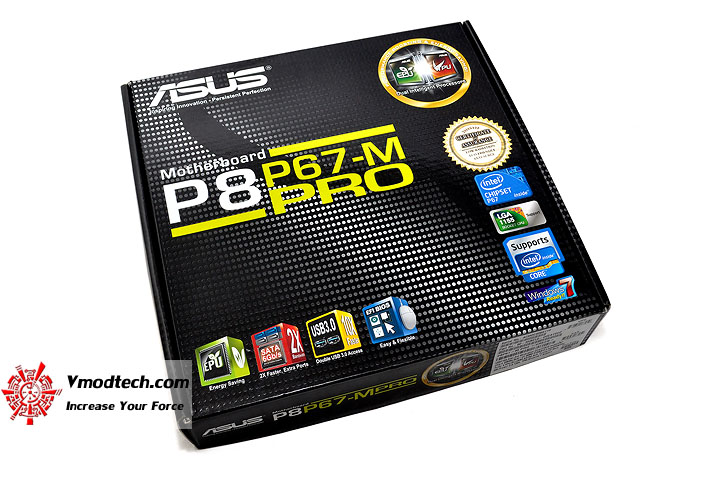
หน้าตาตัวกล่องด้านหน้าครับ โทนดำดุดันสวยงามสไตล์ใหม่ล่าสุดจากทาง ASUS ครับ
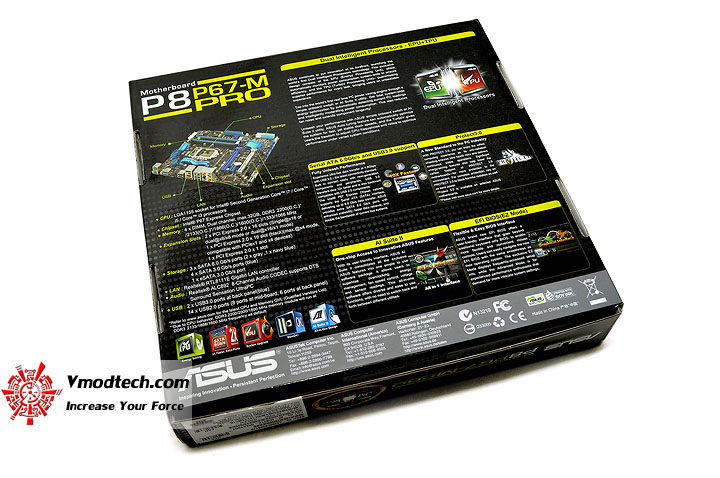
ด้านหลังกล่องบรรยายสเป็คต่างๆของตัวบอร์ดกันเพียบเช่นเคยครับ
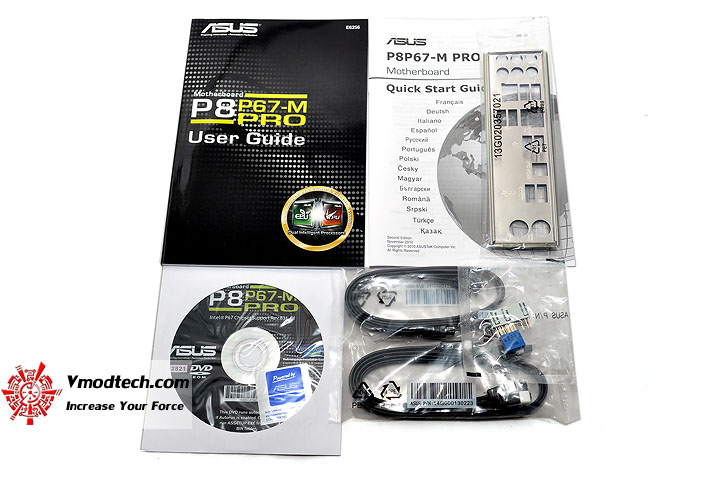
อุปกรณ์ต่างๆที่ Bundle มาในกล่องครับ
Motherboard Appearance
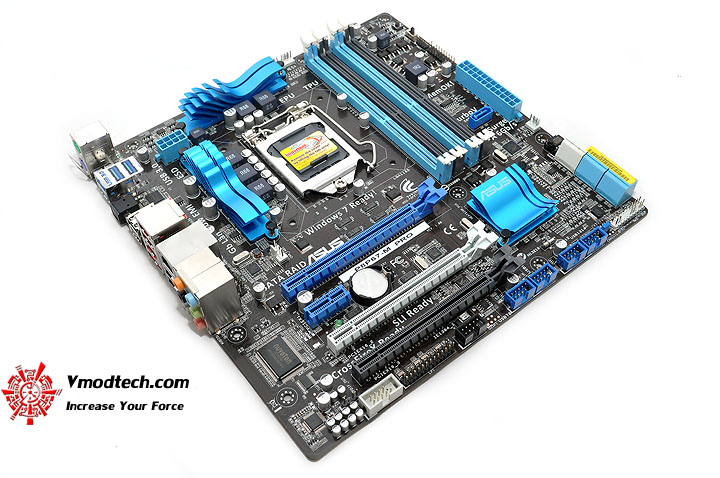
หน้าตาของตัวมาเธอร์บอร์ด โทนสีน้ำตาล ฟ้า น้ำเงิน ยังคงถูกนำมาใช้กันอยู่เช่นเดิมครับสำหรับบอร์ดตระกูลเริ่มต้นของ ASUS
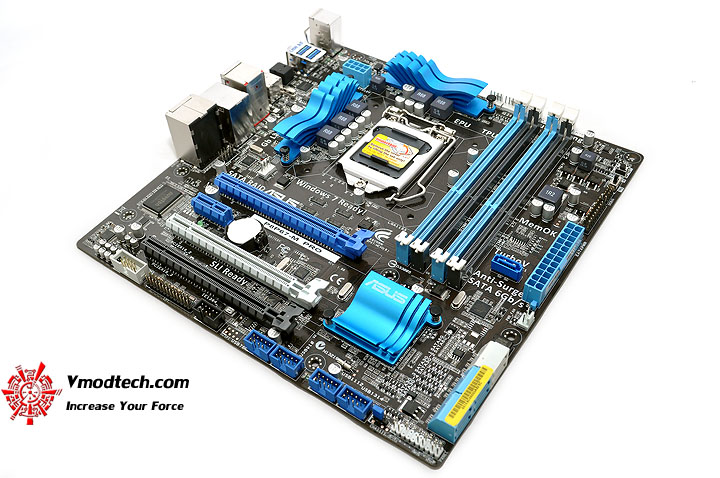
หมุนให้ชมกันอีกมุม สวยงามเล็กกระทัดรัดดีครับ
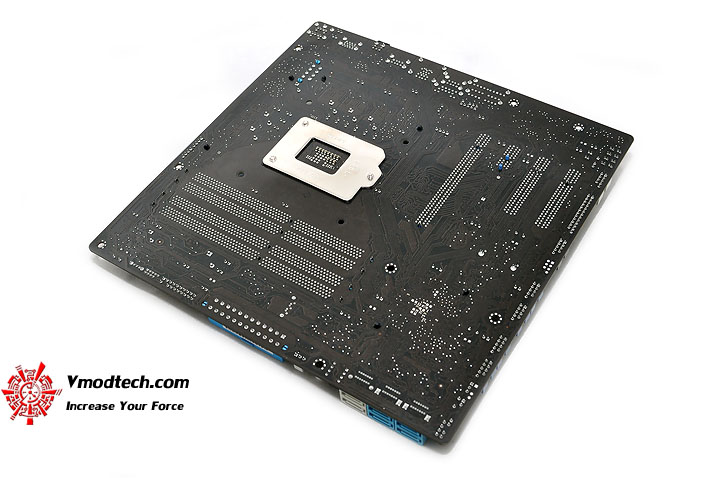
ด้านหลังบอร์ดก็ PCB สีน้ำตาลเข้มกันไปครับ
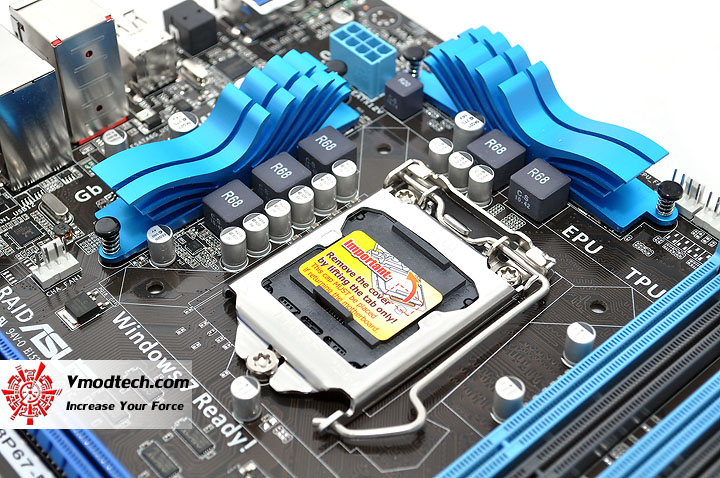
หน้าตาบริเวณรอบๆ CPU Socket สวยงามอย่างมีศิลปะดีอีกแล้วครับ โดยบอร์ดนี้จะมาพร้อมกับภาคจ่ายไฟ 3+2เฟสครับ
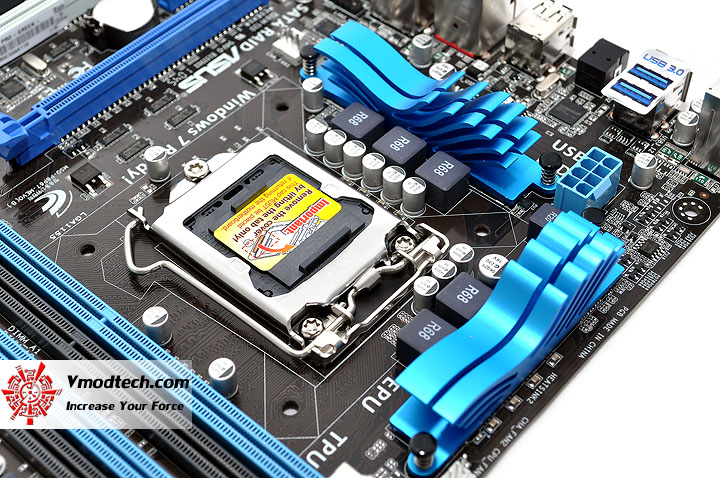
หมุนให้ชมอีกมุมมอง สวยงามพลิ้วไหวดีครับ
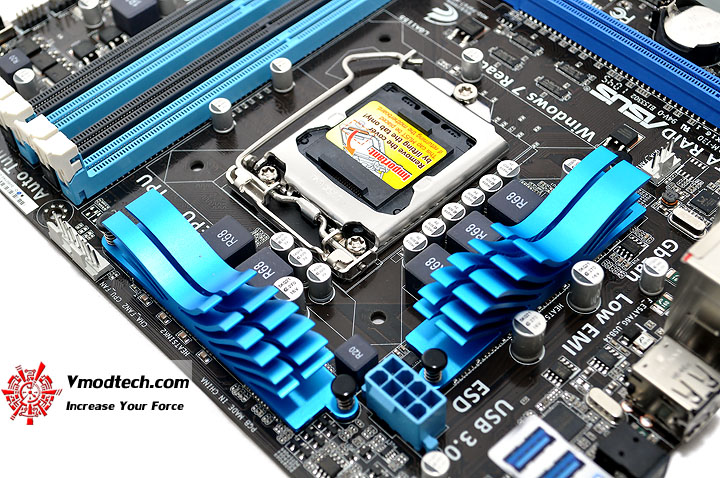
ขั้วไฟเลี้ยง CPU 12V. แบบ 8พิน แบบมาเธอร์บอร์ดรุ่นใหญ่ ก็ถูกนำมาใช้ในมาเธอร์บอร์ดรุ่นนี้ด้วยครับ
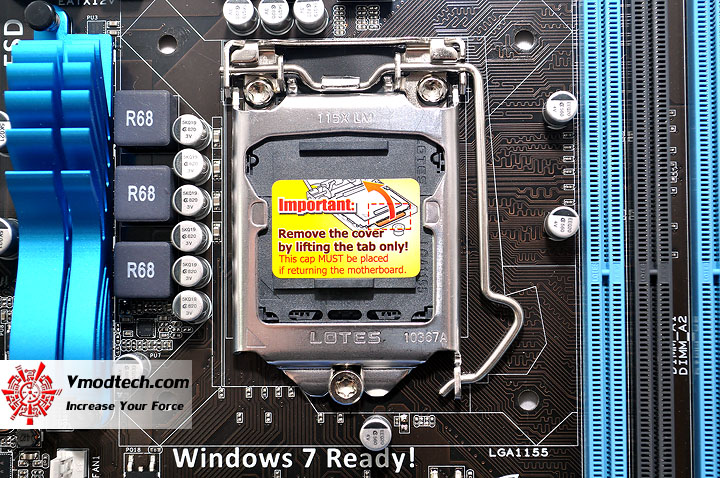
CPU Socket ของมาเธอร์บอร์ดรุ่นนี้จะใช้ของ LOTES นะครับ
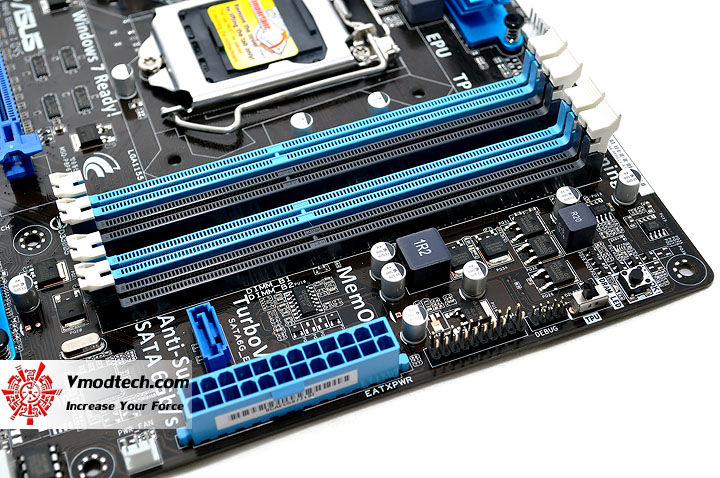
...สล็อตแรมแบบ 4แถว Dual Channel พร้อมปุ่ม MemOK! และสวิทซ์ TPU ด้านข้างครับ สังเกตดีๆ จะมีช่อง SATA3 ที่ควบคุมโดยชิป Marvell อยู่ด้านข้างสล็อตแรมอีก 1Port ด้วยนะครับ
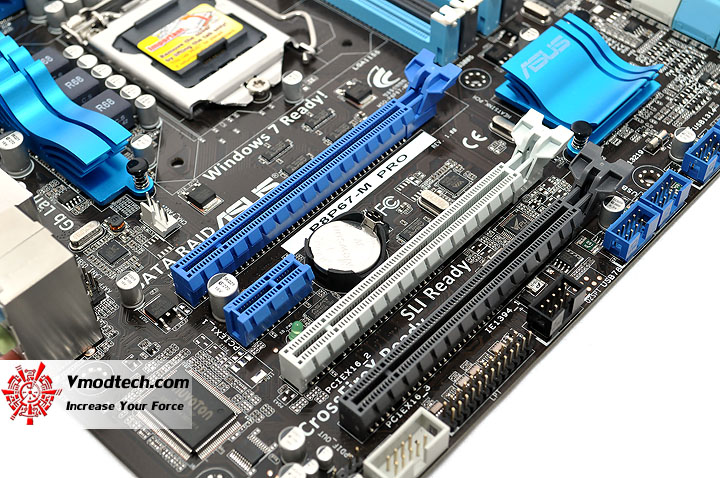
...PCI-e X16 3ช่อง โดยที่ช่อง 1 จะทำงานที่ X16 เมื่อทำงานแบบการ์ดเดี่ยวนะครับ ส่วนช่องที่ 2 จะทำงานที่ X8 ตลอดเวลาครับ ซึ่งทั้งสองช่องนี้จะทำงานร่วมกันได้ในโหมด SLI , CrossfireX ที่ X8+X8 นะครับ ส่วน PCI-e X16 ช่องที่ 3 จะทำงานที่ X4 ตลอดเวลานะครับ ตามด้วย PCI-e X1 อีก 1ช่องนะครับ แน่นเอี๊ยดจนพื้นที่บอร์ดหมดพอดีเลยครับ
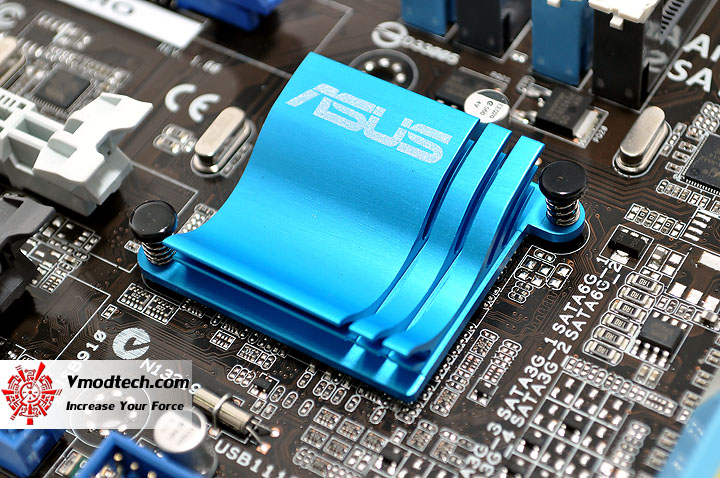
บริเวณซิงค์ของชิป Intel P67 เล็กกระทัดรัดสวยงามครับ แถมยังเย็นดีอีกต่างหาก
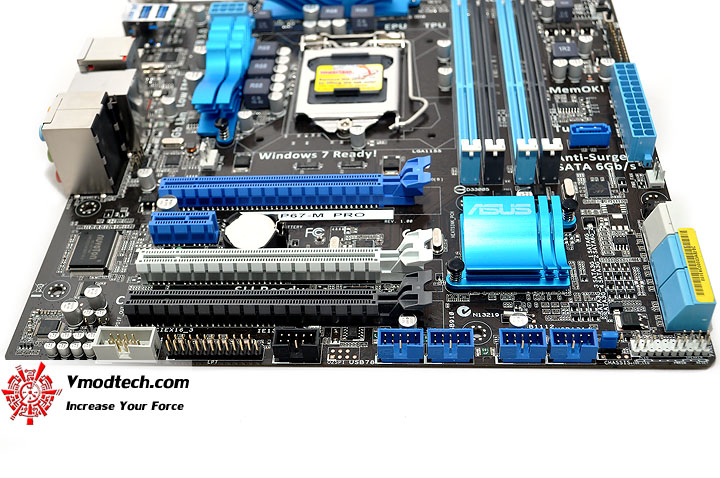
บริเวณที่เสียบ Front Panel ต่างๆ และ Clear CMOS Jumper ครับ
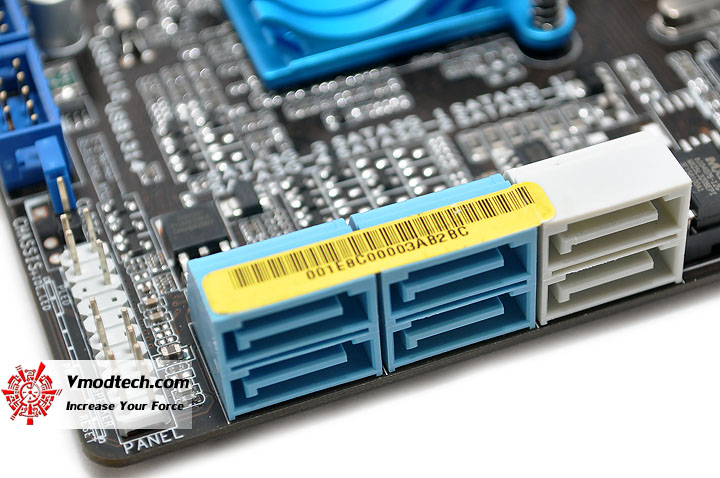
...SATA2 สีฟ้า 4Ports , SATA3 สีเทาอ่อน 2Ports ที่มาจากชิป Intel P67 รวมกับช่อง SATA3 สีน้ำเงิน 1Ports ที่ควบคุมโดยชิปจาก Marvell ที่อยู่ข้างสล็อตแรม ก็จะรวมกันทั้งหมดมี 7Ports SATA นะครับ มากันเพียบจริงๆครับ สำหรับช่อง SATA ของมาเธอร์บอร์ดเล็กๆรุ่นนี้
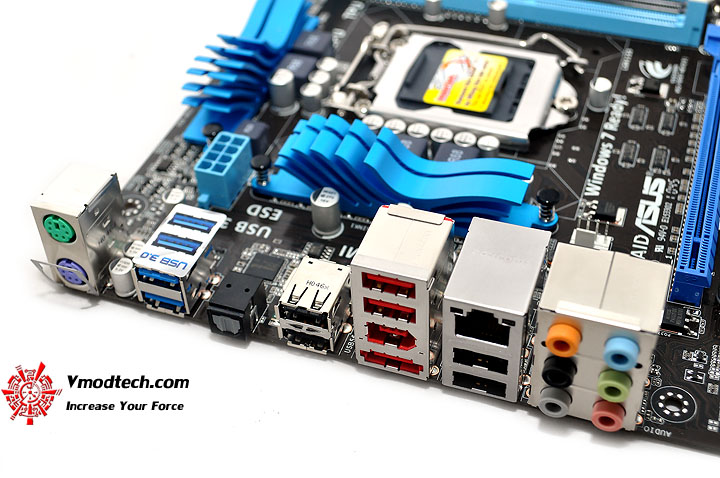
Back Panel ด้านหลังมากันครบๆทุกการเชื่อมต่อ พร้อมช่อง USB 3.0 สีฟ้าอีก 2ช่องทาง
Test Setup
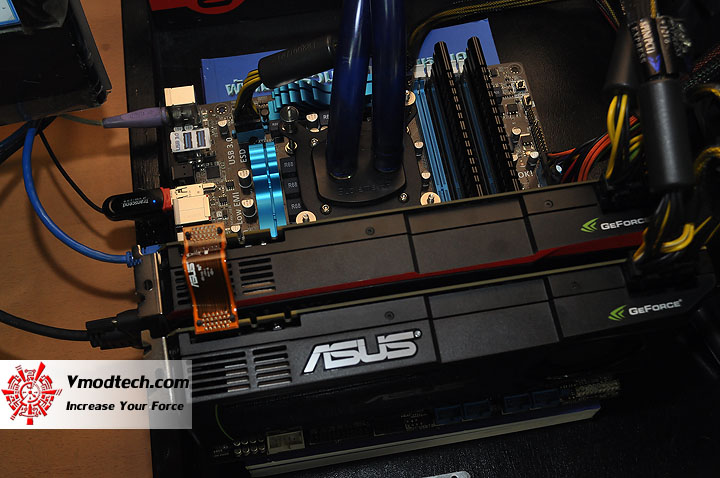
ทดสอบกันด้วยระบบระบายความร้อนด้วยน้ำธรรมดา ในห้องปรับอากาศที่มีอุณหภูมิประมาณ 25องศาเซลเซียสกันเช่นเดิมครับ
| .SYSTEMS | |
| .CPU | ..Intel Core i7 2600K |
| .Motherboard | ..ASUS P8P67-M PRO |
| .Memory | ..G.Skill F3-17600 CL7D-4GBPIS 2GB*2 Dual Channel |
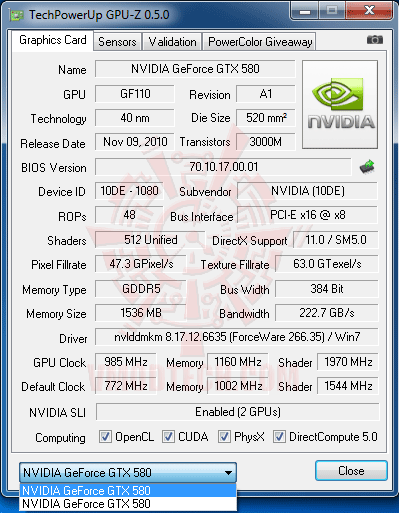
| .Graphic Card | ..ASUS & Galaxy GTX 580 @ 985/1,970/4,640MHz |
| .Harddisk | ..WD1002FAEX 1TB SATA3 |
| .CPU Cooler | ..Water Cooling @ Ambient 25C |
| .Power Supply | ..Antec TPQ-1200 OC Version 1200W |
| .Operation System | ..Windows 7 Enterprise 32-bit |
เพื่อไม่ให้เป็นการเสียเวลา เริ่มทำการทดสอบกันในแบบโอเวอร์คล็อคล้วนๆ ตามแนวถนัดของ Vmodtech.com กันเลยดีกว่าครับ
CPU-Z Validation
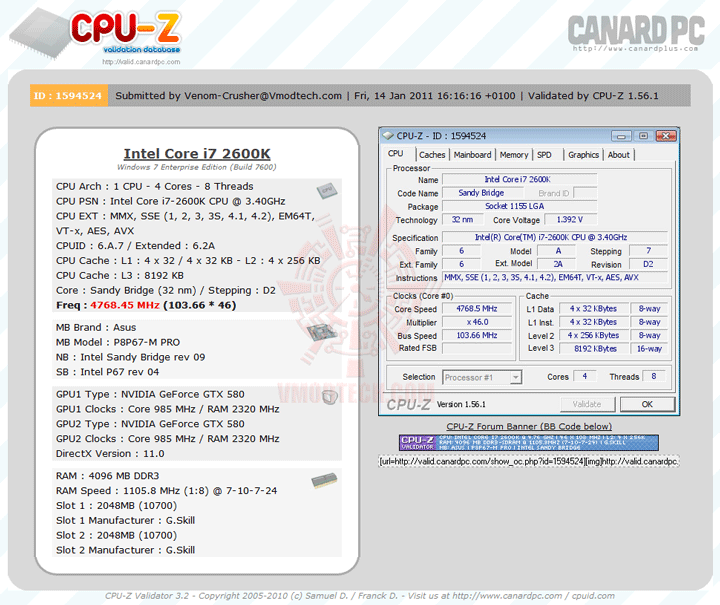
(Click ScreenShot to Validation Link)
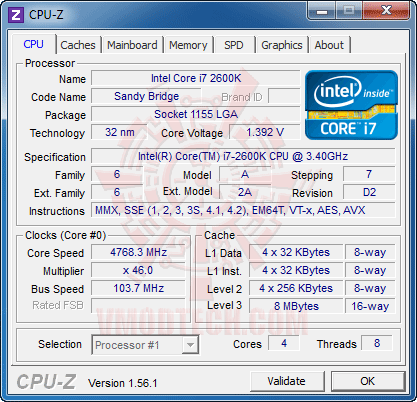
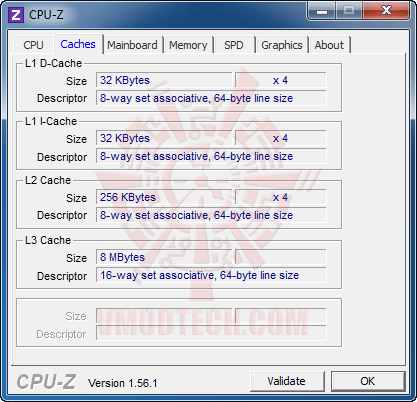
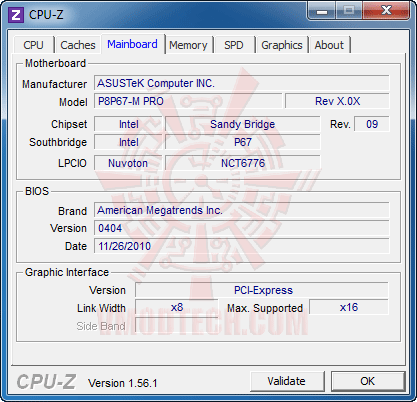
CPU-Z Detail
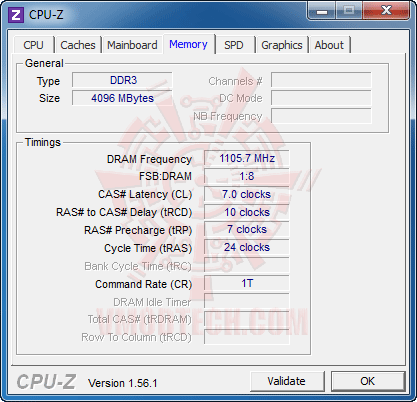
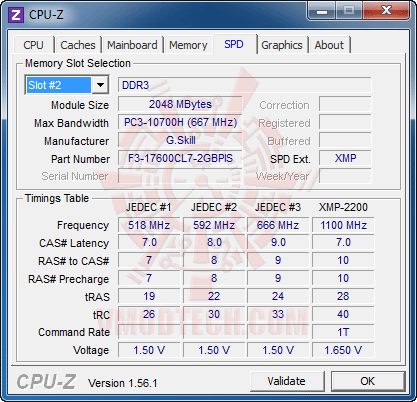
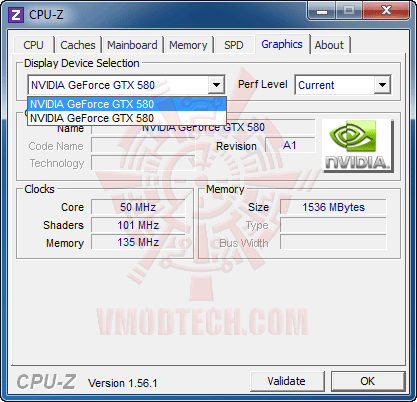
GPU-Z Detail
AIDA64 Detail
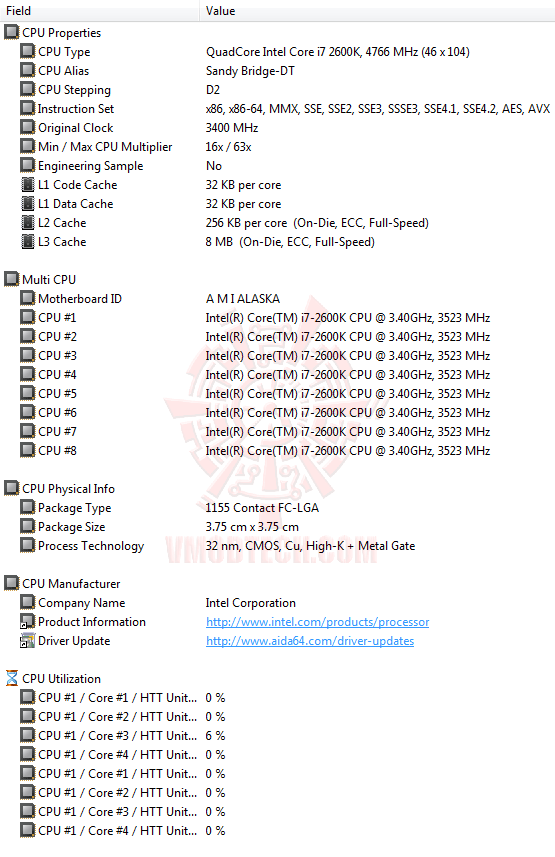
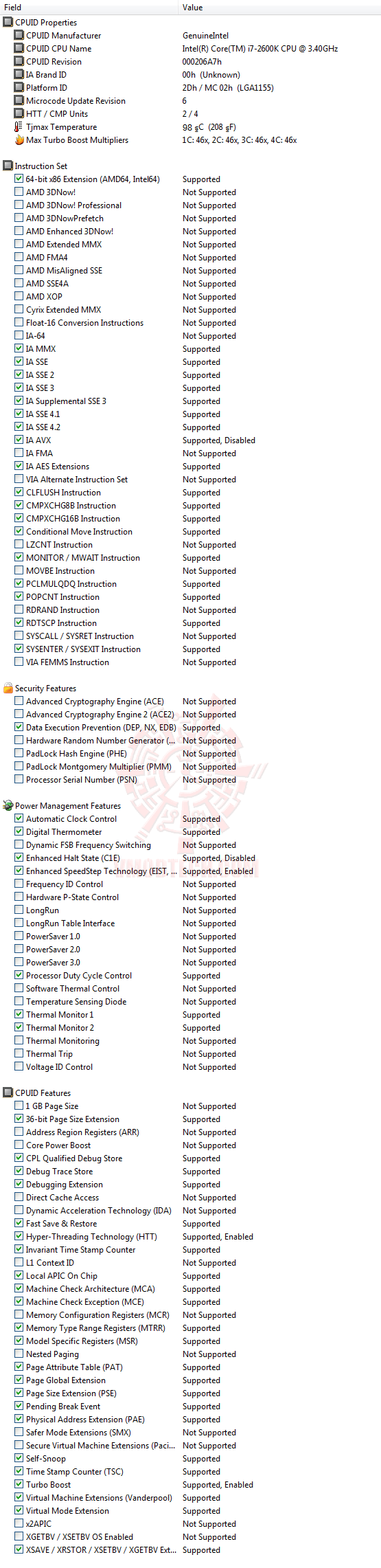
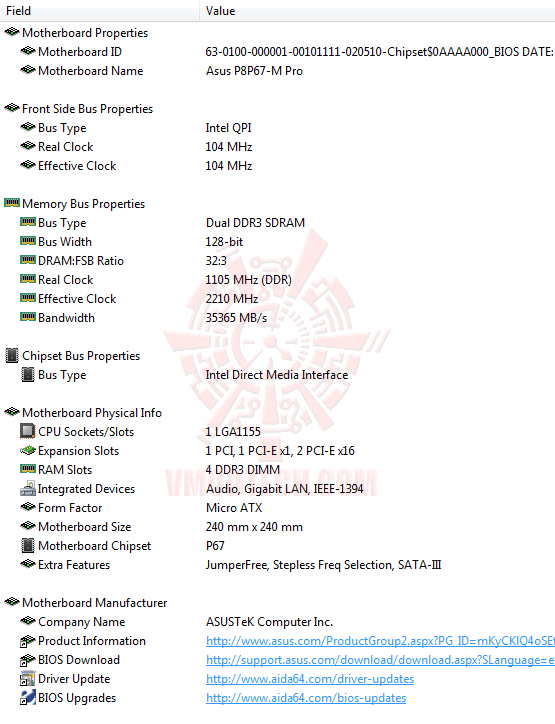
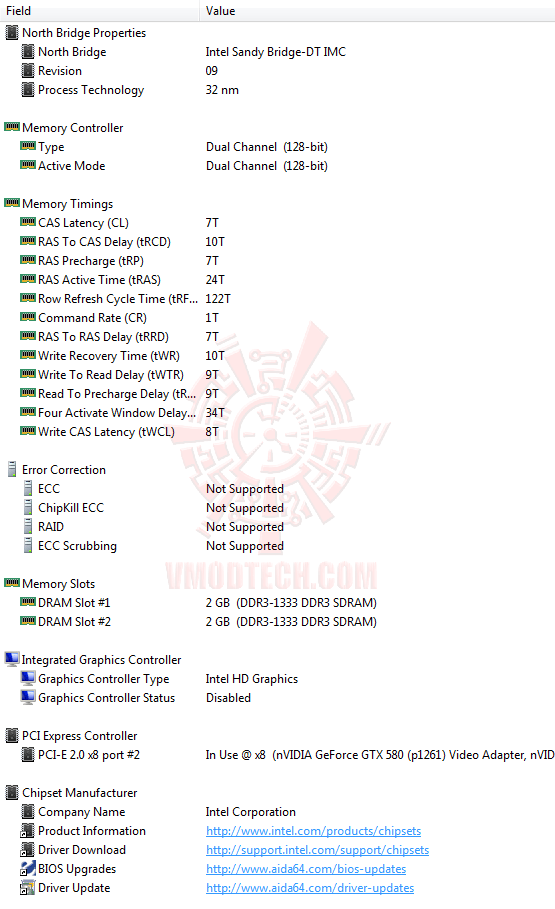
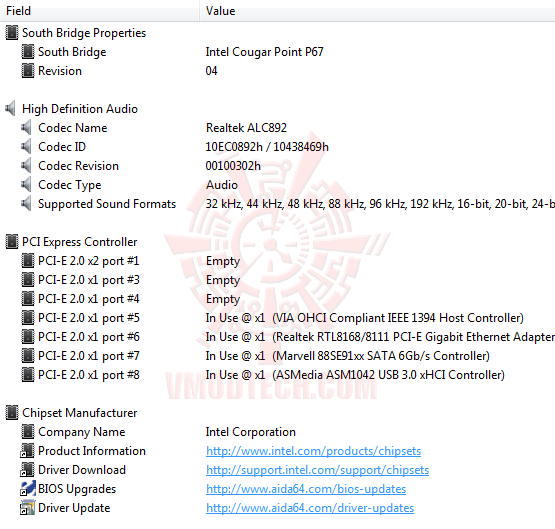
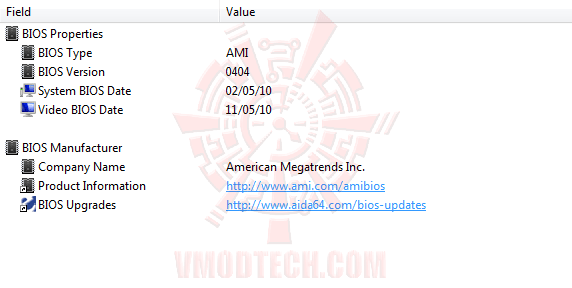
...เนื่องจากว่า BIOS ล่าสุดของบอร์ดรุ่นนี้ขณะที่ทำการทดสอบ ยังไม่ Supported การ Enable Internal PLL OverVoltage นะครับ ก็เลยติด MHz Wall ของตัว CPU เอง ซึ่งเท่าที่ลองๆซีพียูตัวที่ผมใช้ทดสอบนี้จะไปไม่ถึง 4.8GHz นะครับ ถ้าหากว่าไม่ได้ Enable Internal PLL OverVoltage ช่วย ผลการทดสอบในคราวนี้ผมก็เลยไปเน้นลาก BClk ช่วย เพื่อให้ไปใกล้เคียงกับ MHz Wall ของซีพียูตัวนี้ แล้วก็ไปหยุดอยู่ที่ความเร็ว 4,768MHz BClk 103.7MHz DDR3-2211 7-10-7-24-1T แล้วก็ไปทดสอบกันเลยครับ ว่าจะผ่านอะไรกันบ้าง
LinX 0.6.4 Problem size 15500 Memory used 1846MB (All of 32-bit OS) 20Loops
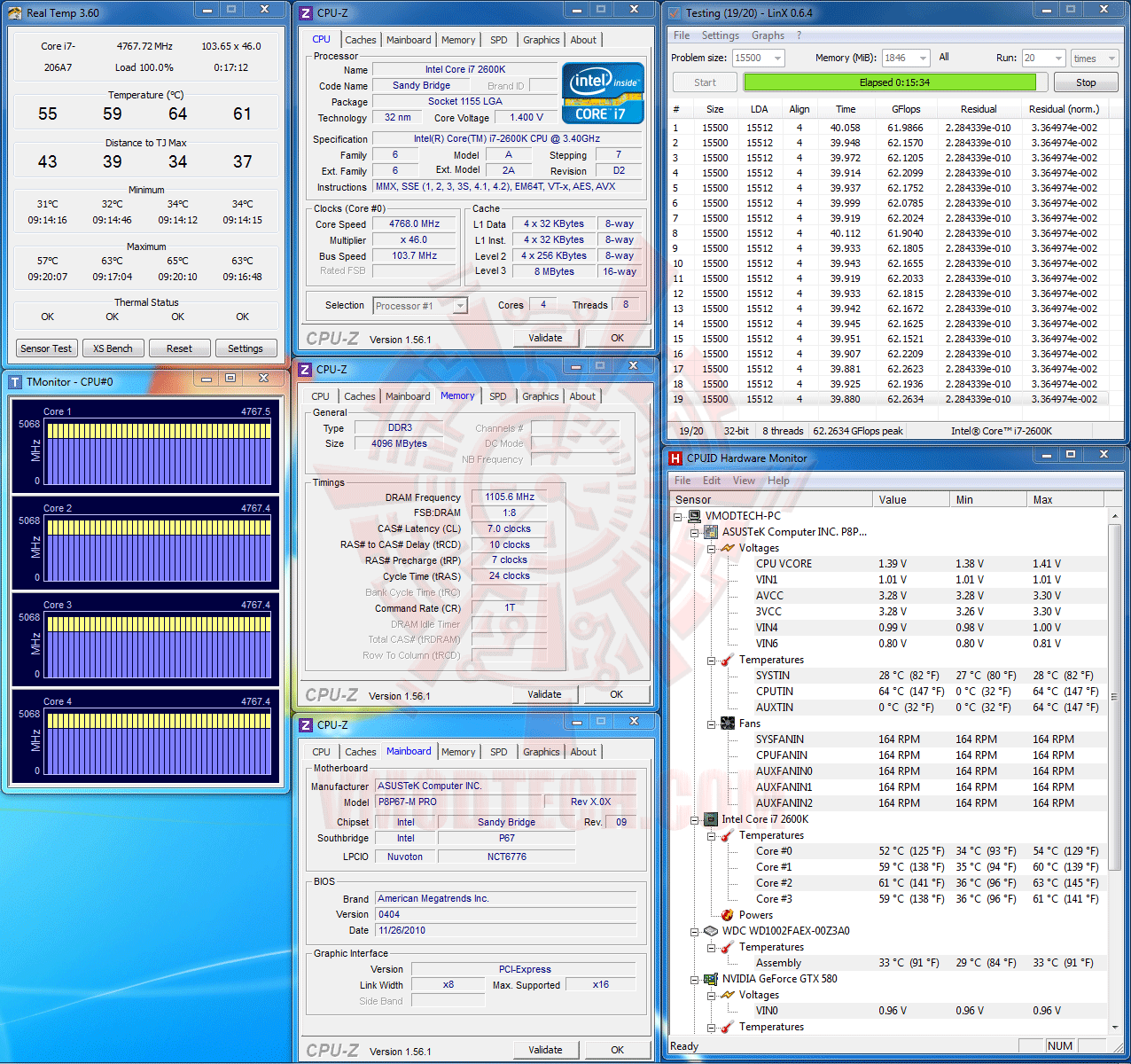
(Click ScreenShot to Enlarge)
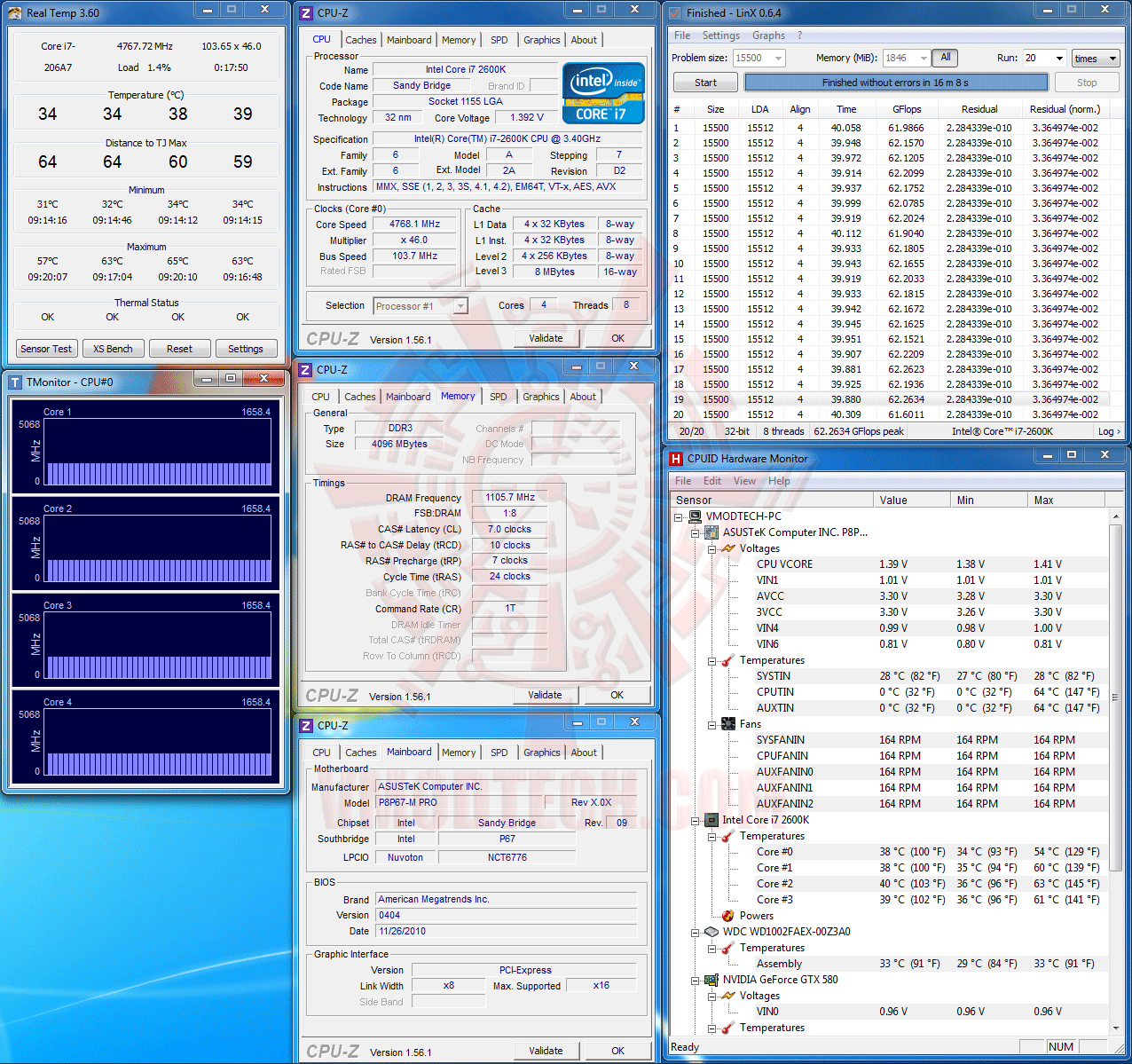
(Click ScreenShot to Enlarge)
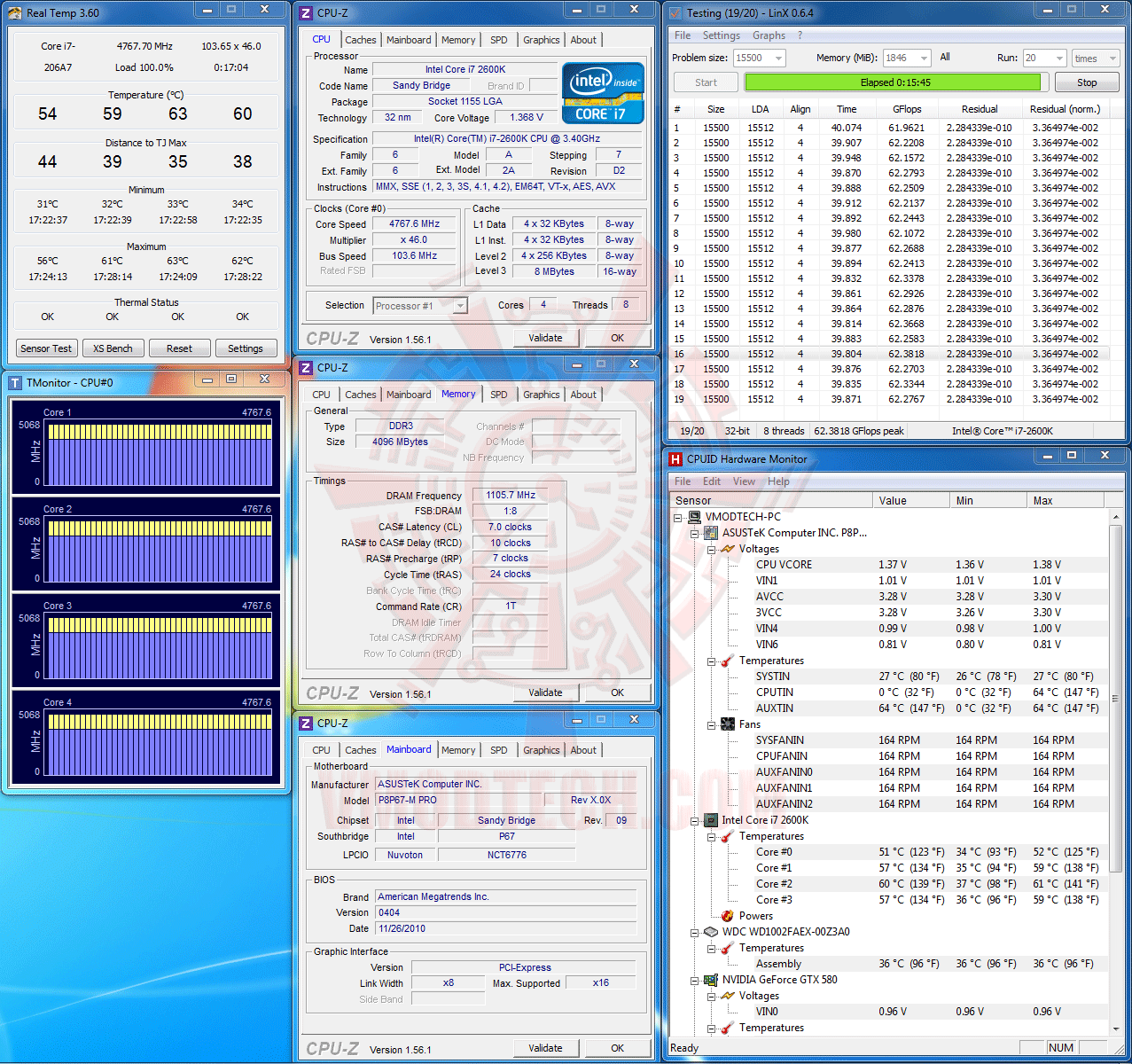
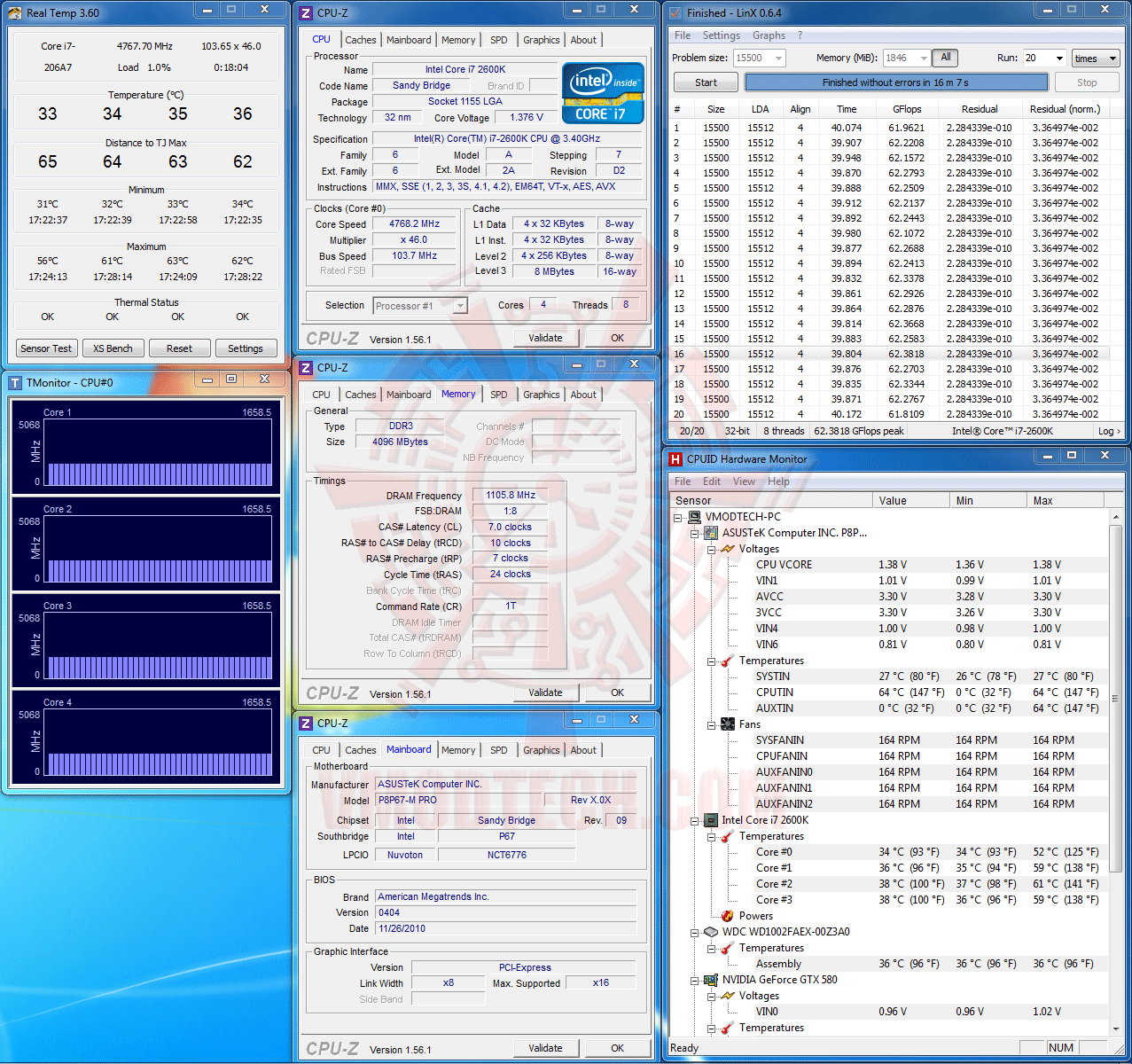
…จัดกันไป 20Loops กันตามมาตรฐานนะครับ ผ่านสบายครับสำหรับ LinX ตัวคูณที่ 46 ล็อคกันสนิท ไม่มีแอบร่วงตอน FullLoad หนักๆแต่อย่างใด ที่ไฟ VCore FullLoad สูงสุดที่ 1.41V. จะร้อนสูงสุดที่ 65องศาเซลเซียสใน Real Temp เพียงเท่านั้นครับ
SuperPI 1M 1Thread, 32M 1Thread & 32M 8Threads
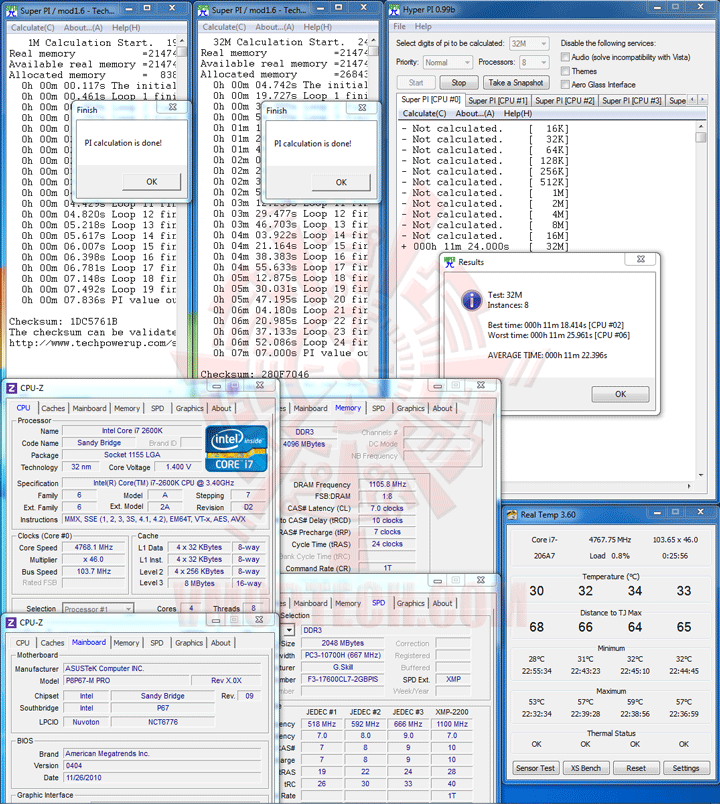
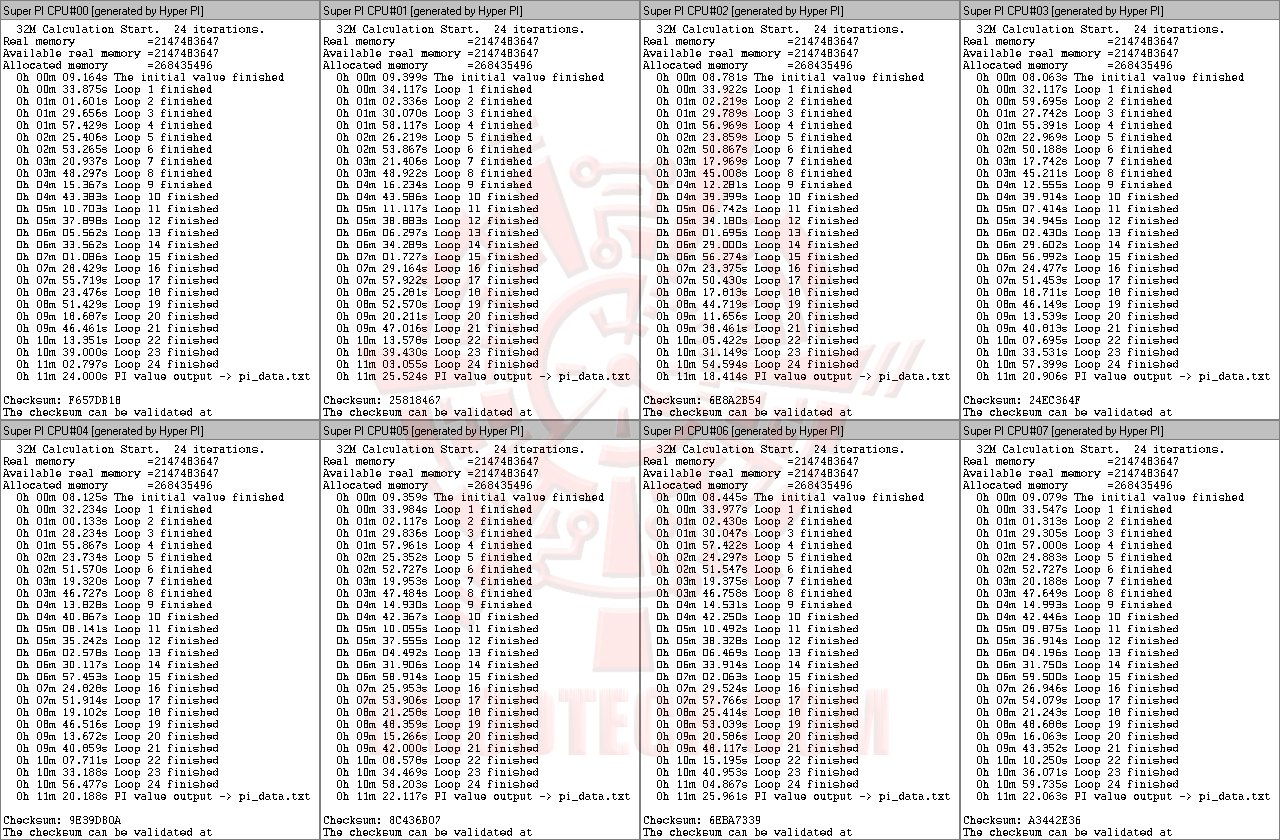
(Click ScreenShot to Enlarge)
...ตามด้วยการทดสอบความเสถียรขั้นต่ำของเว็บไซต์เรา ด้วย SuperPI 32M 8Threads ซึ่งก็ผ่านกันแบบสบายๆครับที่ความเร็วระดับนี้ โดย SuperPI 1M กดไปได้ที่ความเร็ว 7.836S ส่วน SuperPI32M 1Thread ก็กดไปที่ 7M 07.000S และสุดท้าย SuperPI32M 8Thread ก็จบไปด้วยเวลาเฉลี่ยที่ 11M 22.396S เมื่อเสถียรกันเพียงพอแล้วเราก็ไปลุยเทสต์ดูประสิทธิภาพกันต่อที่หน้าถัดๆไปเลยนะครับ
WinRAR3.91 ,wPrime2.00 ,CPUMark99 & Fritz Chess
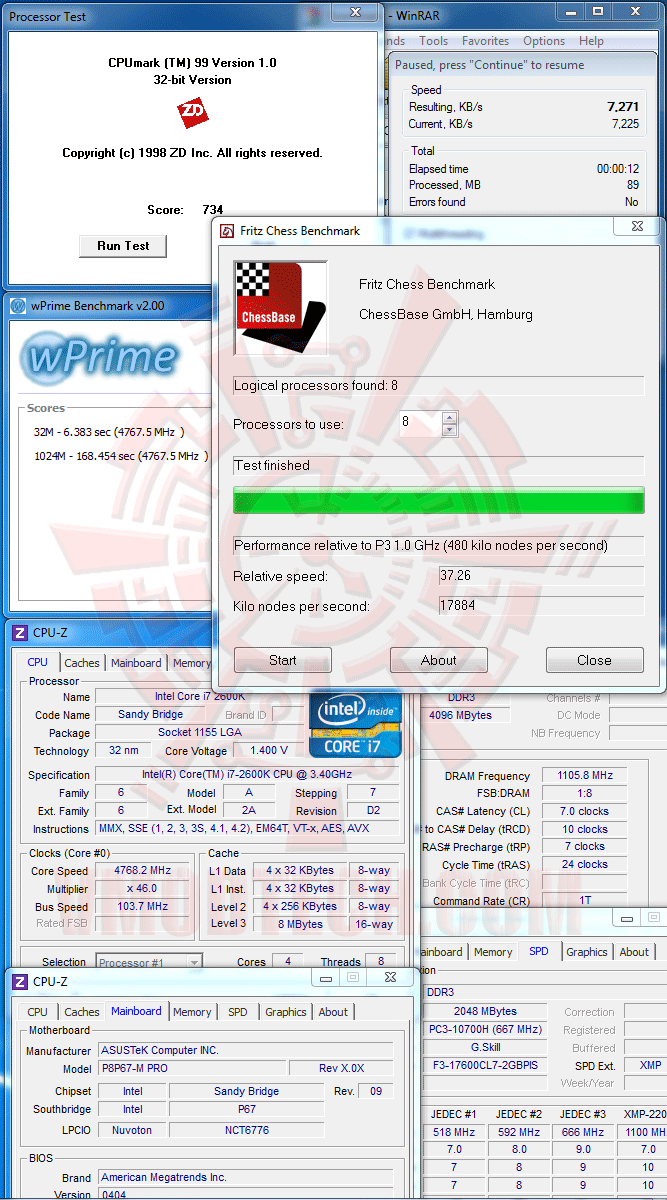
...ผลเทสต์โดยรวมประสิทธิภาพที่ออกมาก็แรงแบบไม่น่าเชื่อว่าวิ่งอยู่แค่ความเร็ว 4.7GHzกว่าๆเลยครับ โดยเฉพาะ Winrar ที่แรงกันถึงระดับ 7,271KB/s !!
CINEBENCH R9.5
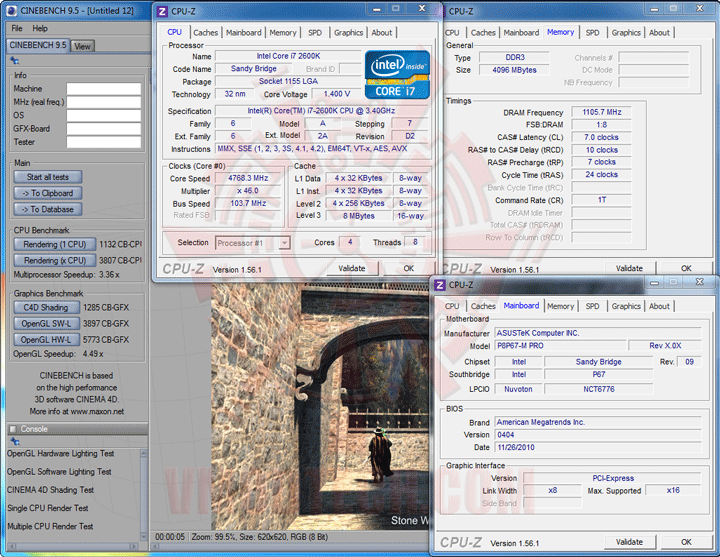
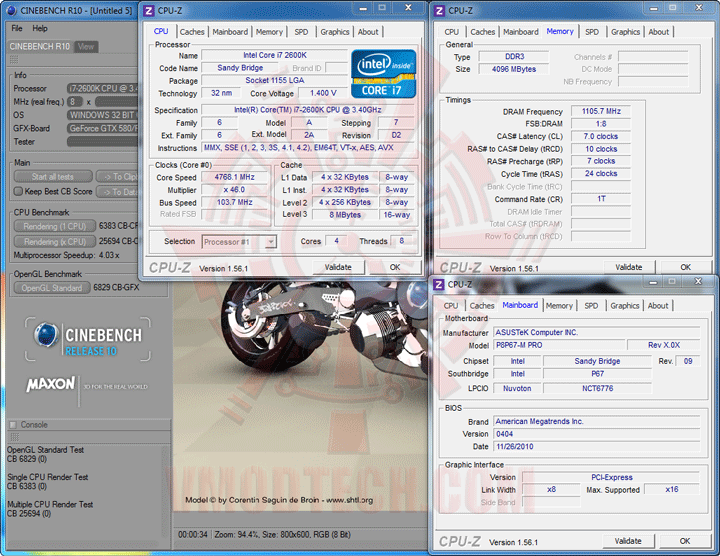
CINEBENCH R10
CINEBENCH R11.5
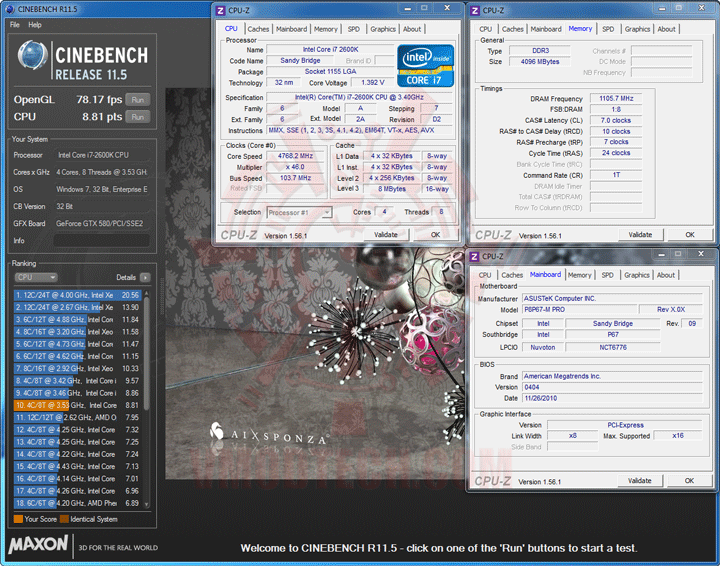
แรงครับ สำหรับ CineBench Series
PCMark 05
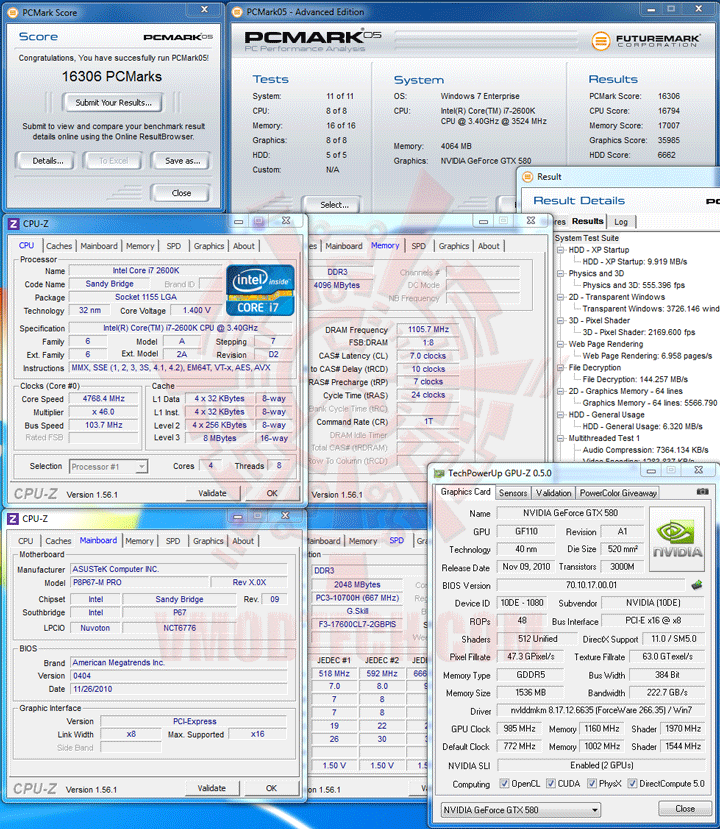
คะแนน PCMark 05 ก็ออกมาแรงแบบหายห่วงที่ 16,306คะแนน ด้วยพลังจากฮาร์ดไดร์ฟจานหมุนธรรมดาเพียงเท่านั้น
AIDA64 Extreme Edition
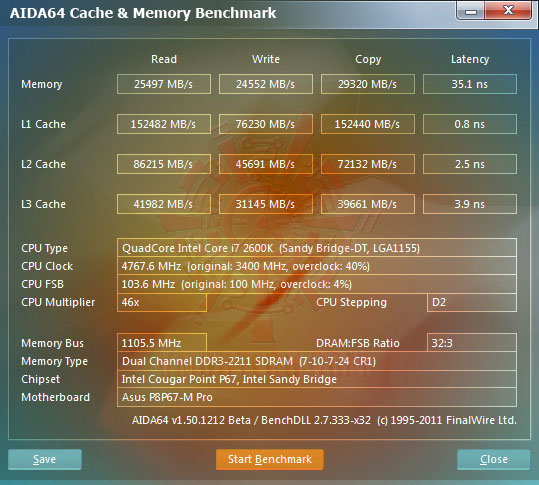
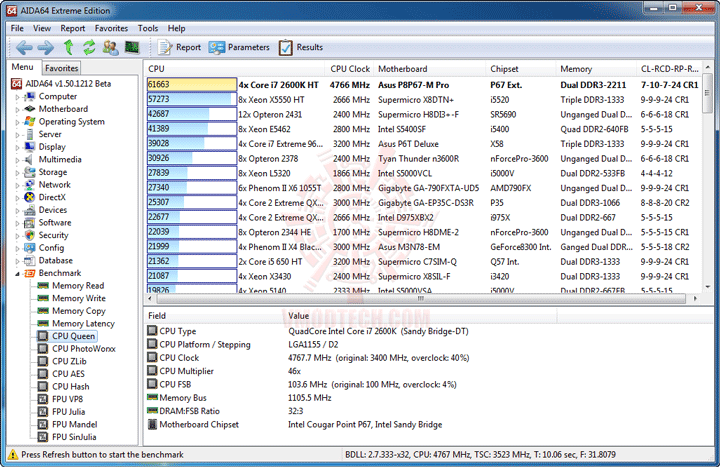
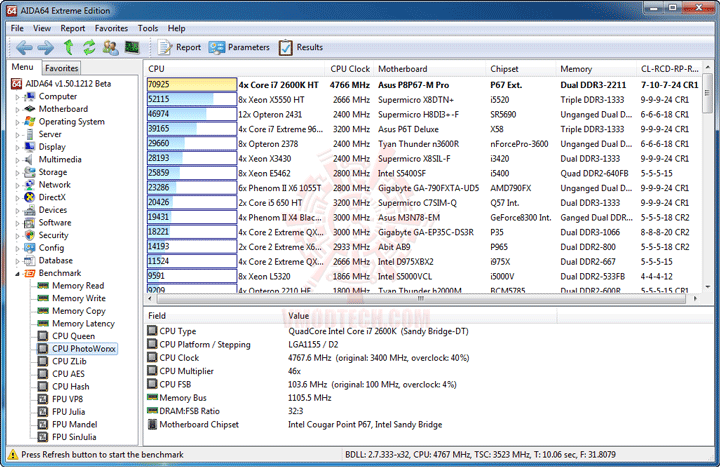
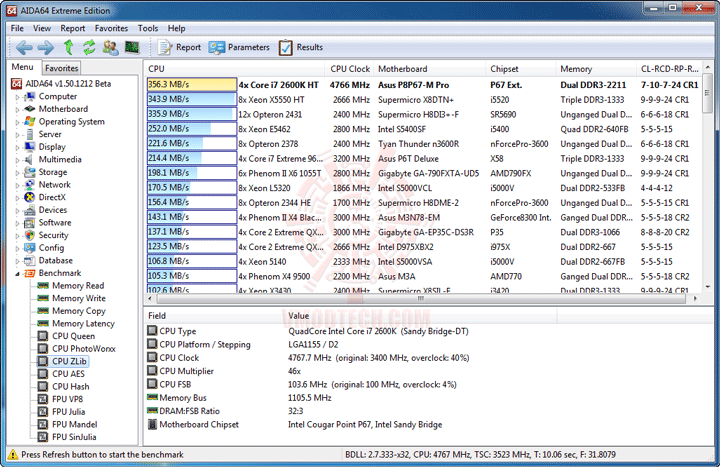
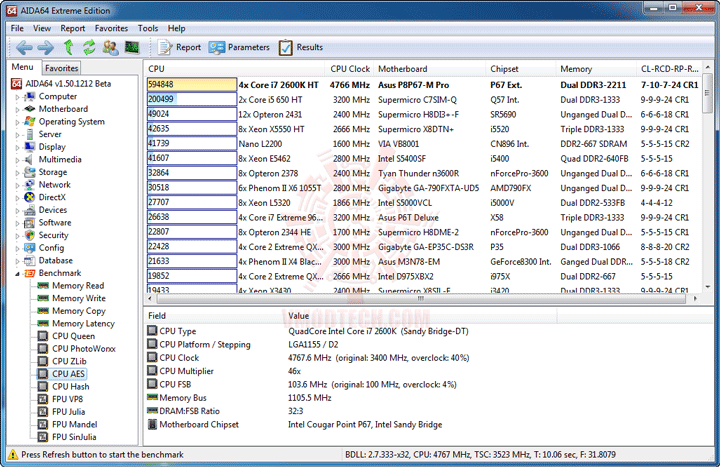
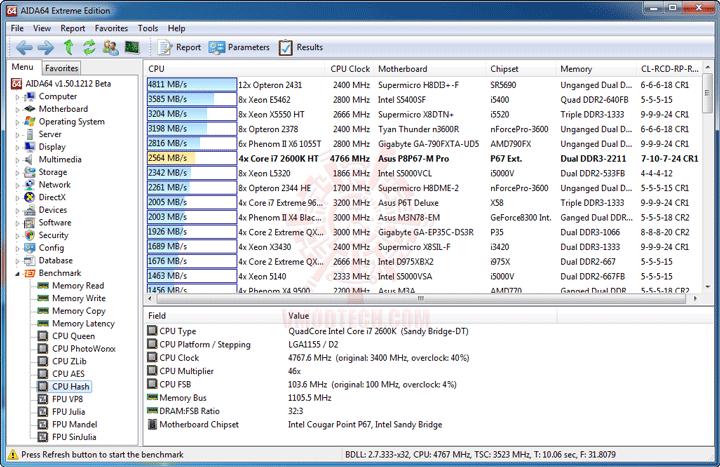
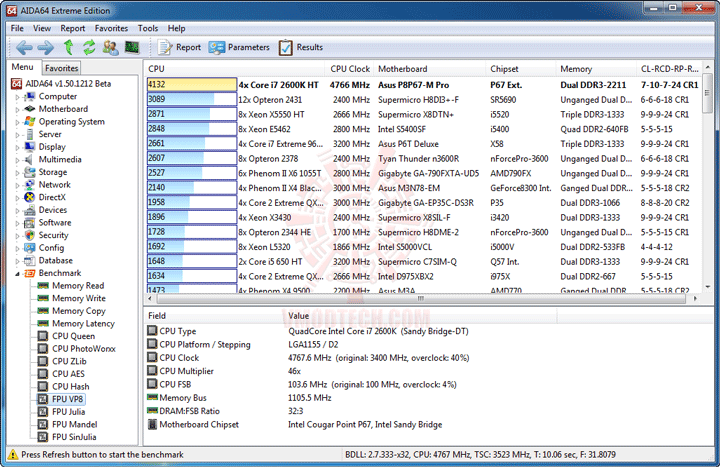
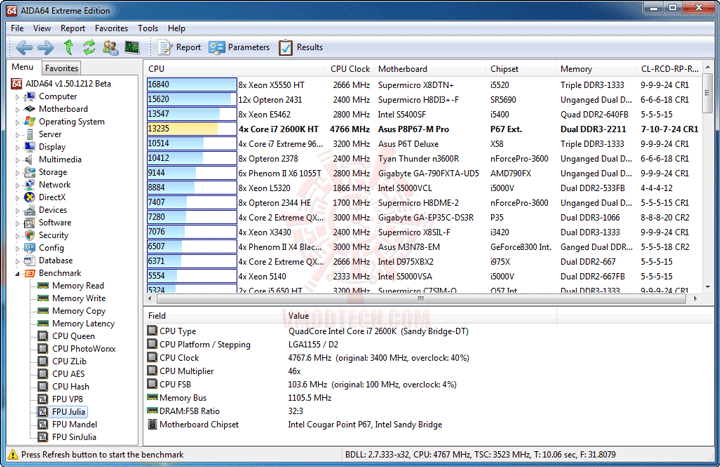
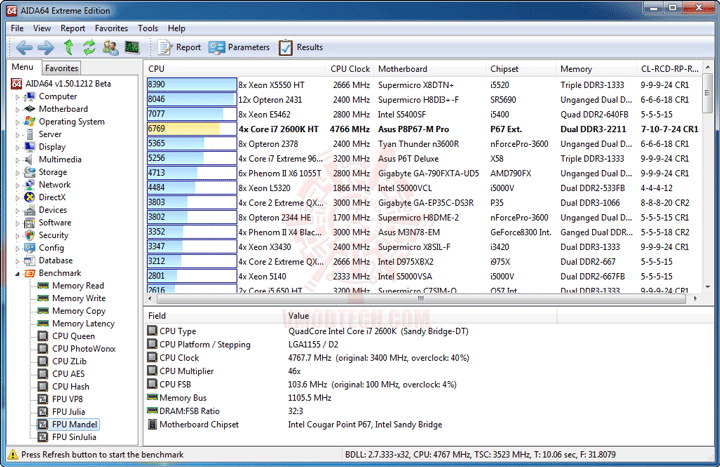
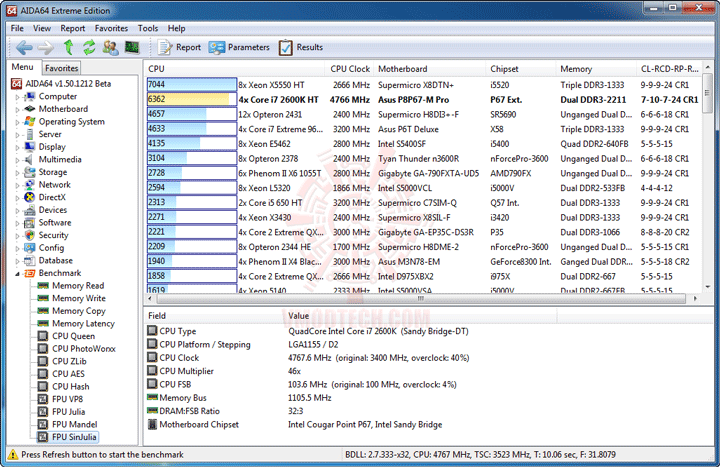
ก็ยังแรงครับแม้วิ่งแค่ความเร็ว 4.7GHz กว่าๆ โดยเฉพาะ Memory Bandwidth ที่่ Triple Channel DDR3 2000+ ยังต้องอายม้วน
Sisoft Sandra
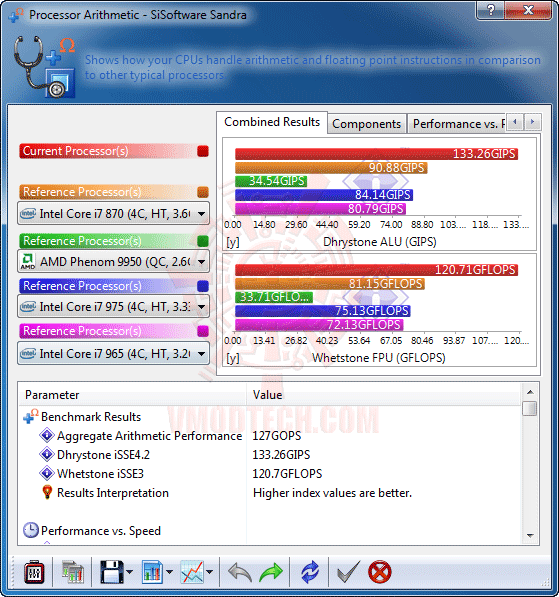
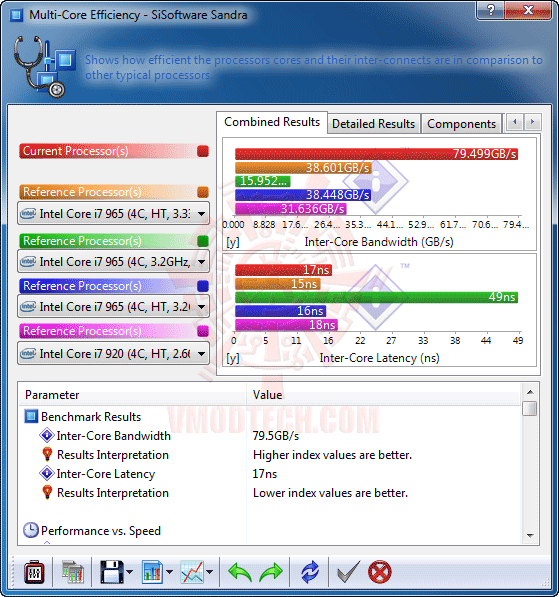
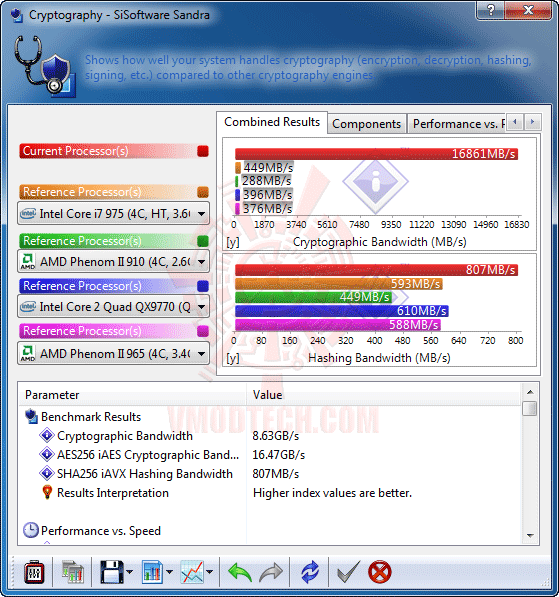
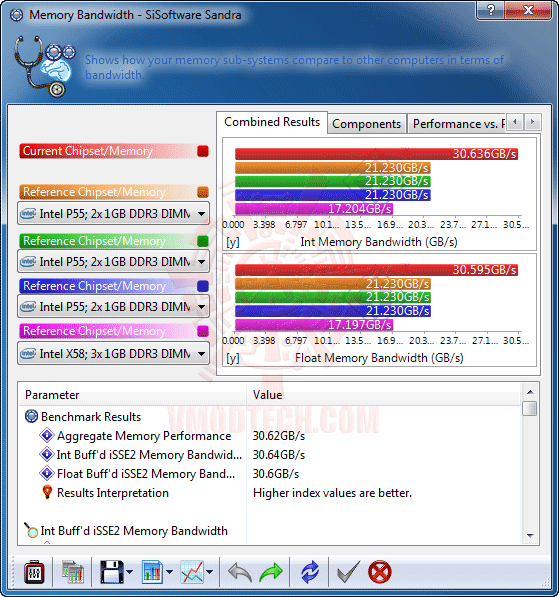
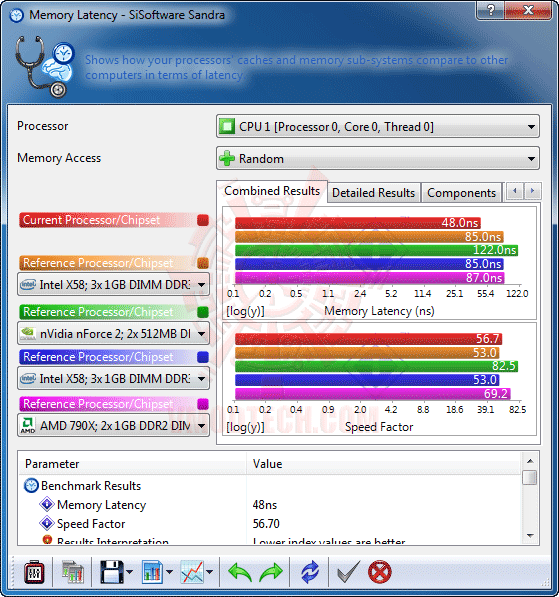
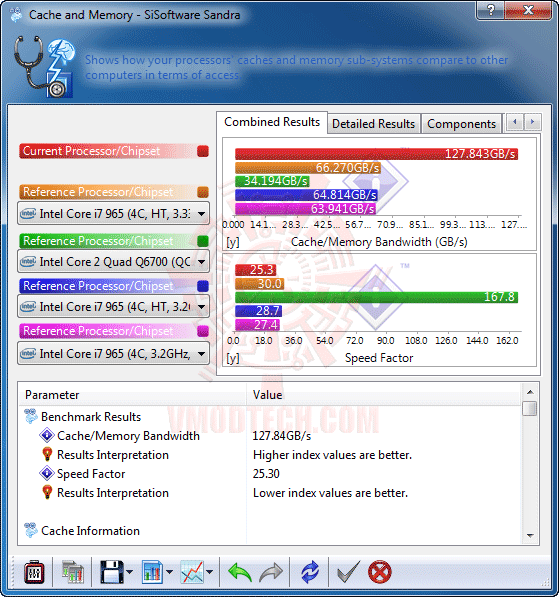
แรงเช่นกันครับสำหรับ Sisoft
3DMark 03
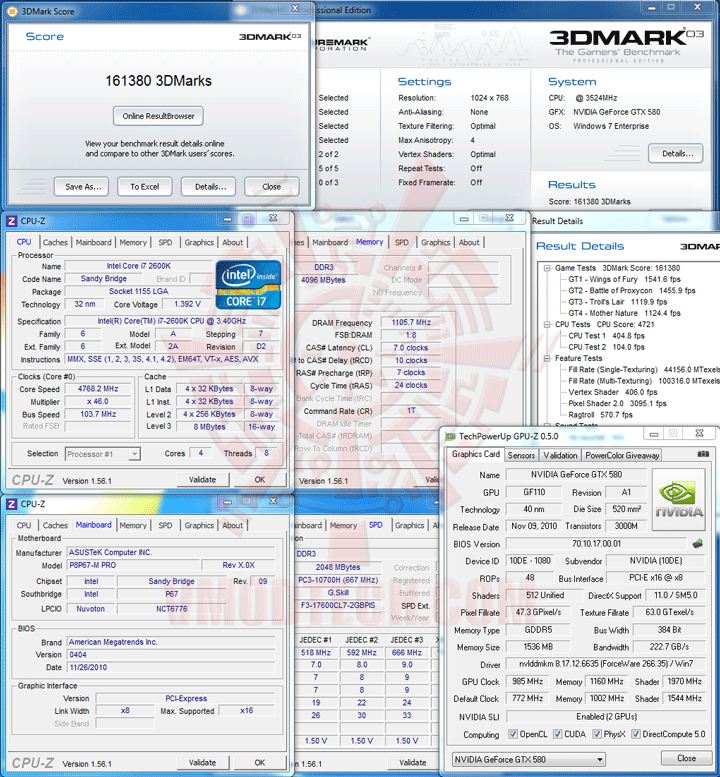
คราวนี้จัด GTX 580 SLI ให้ชมกันอีกรอบนะครับ แรงจริงๆเลยครับกับคะแนน 161,380 ของ 3DMark 03
3DMark 05
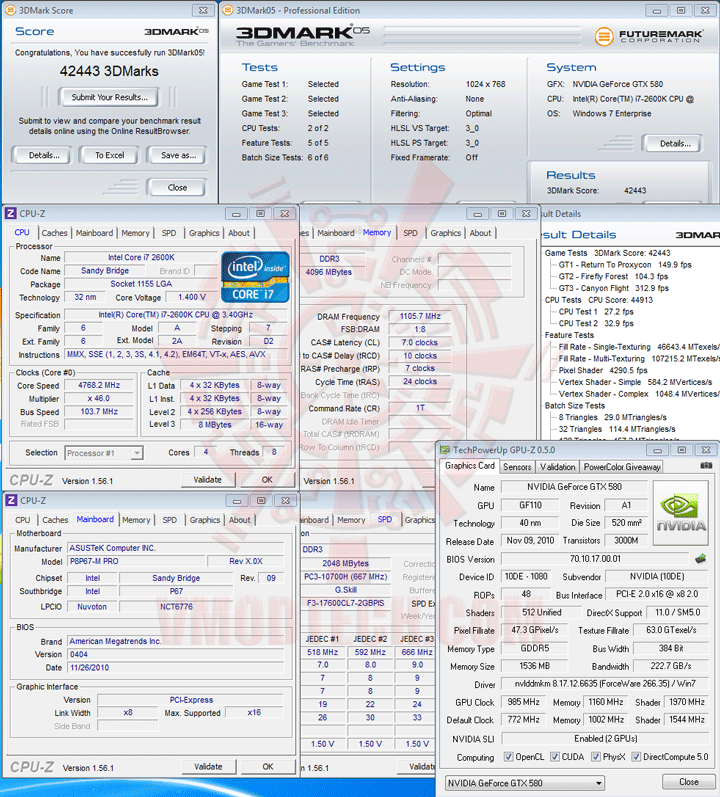
พอมา 3DMark 05 โอ้วว ทะลุระดับ 42.4K ไปแล้วครับ 4.76GHz เองนะเนี่ย
3DMark 06
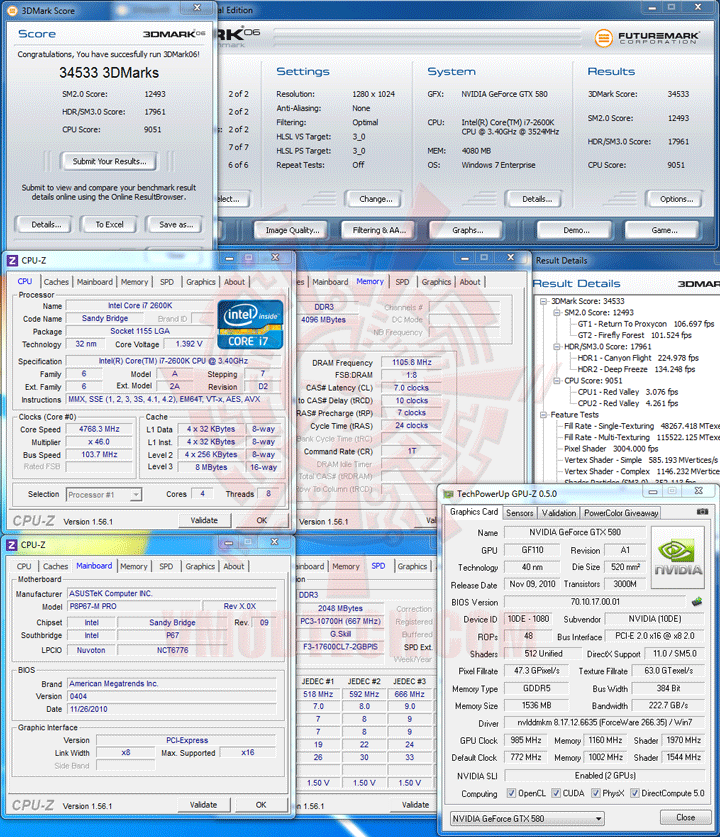
3DMark 06 ก็ยังแรงครับกับ 34,533 คะแนน
3DMark Vantage PhysX Disable
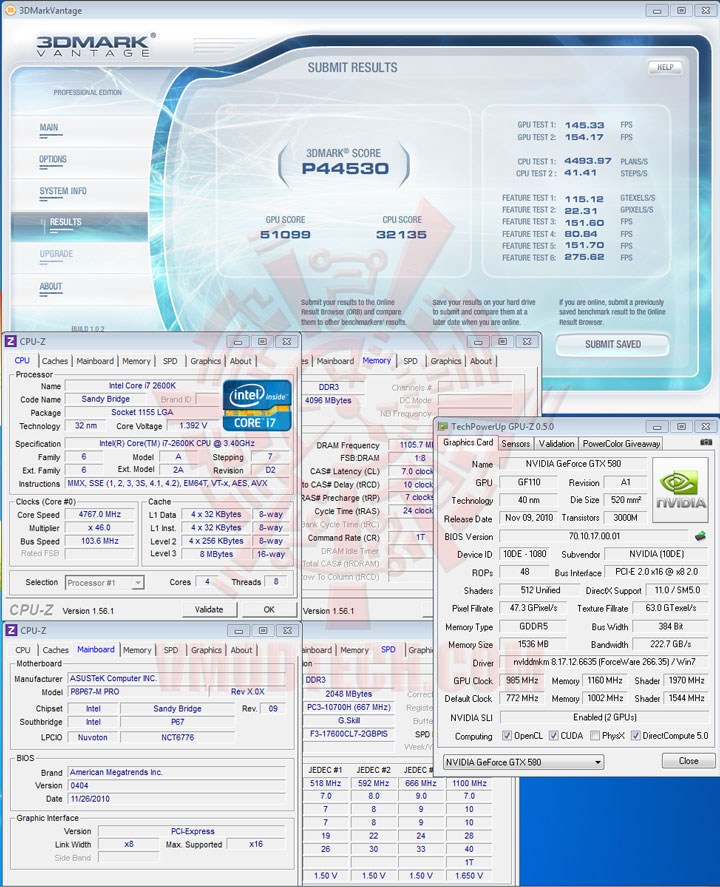
ส่วน 3DMark Vantage ขนาดปิด PhysX ก็ยังแรงทะลุระดับ 44,530 คะแนนกันไป
3DMark Vantage PhysX Enable
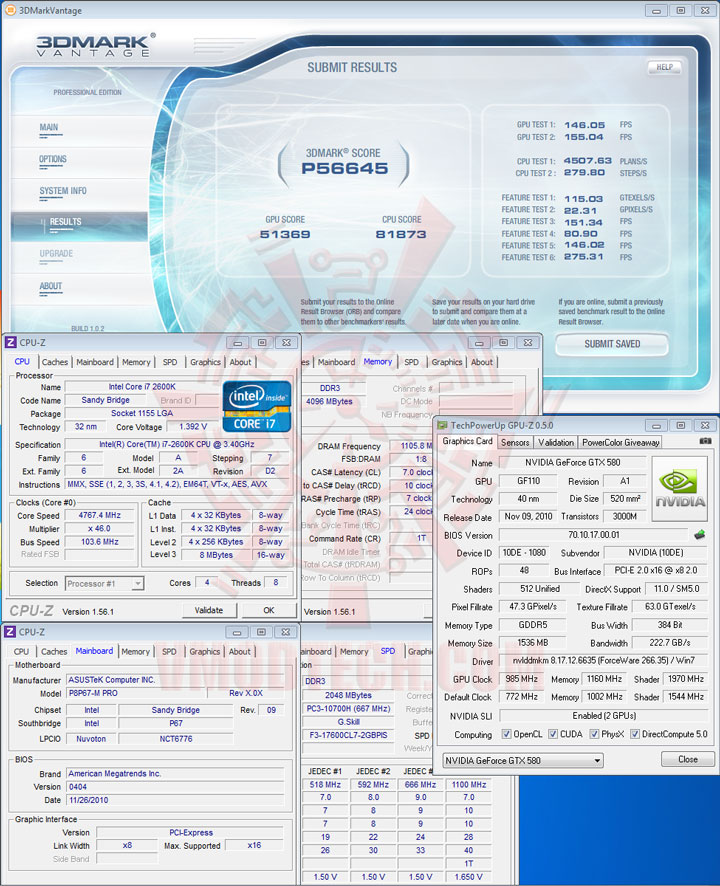
และพอเปิด PhysX ขึ้นมาเพียงเท่านั้น จัดไปครับที่ 56,645 คะแนน
3DMark 11
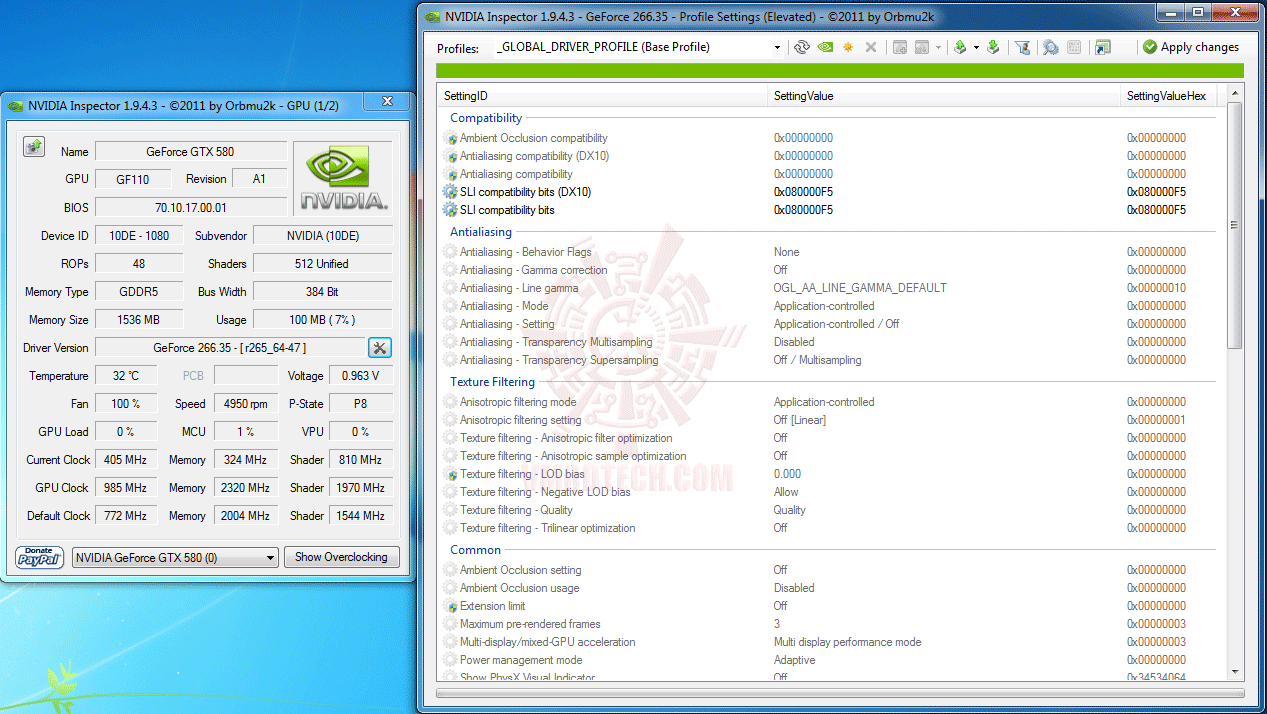
...3DMark 11 จะมีปัญหากับ SLI นิดหน่อยนะครับ ต้องใช้ NVIDIA Inspector ช่วย Patch แก้ โดยวิธีการก็เปิดโปรแกรมนี้ขึ้นมา เลือกไปที่รูปไขควงไขว้กับประแจ แล้วเลือกเปลี่ยนค่าที่หัวข้อ SLI compatibility bits (DX10) และ SLI compatibility bits จากเดิม 0x00000000 ให้เป็น 0x080000F5 ทั้งคู่และสุดท้ายไปเลือก Apply changes ก็เป็นอันเรียบร้อย ปิดโปรแกรมนี้แล้วก็เทสต์กันได้เลยครับ
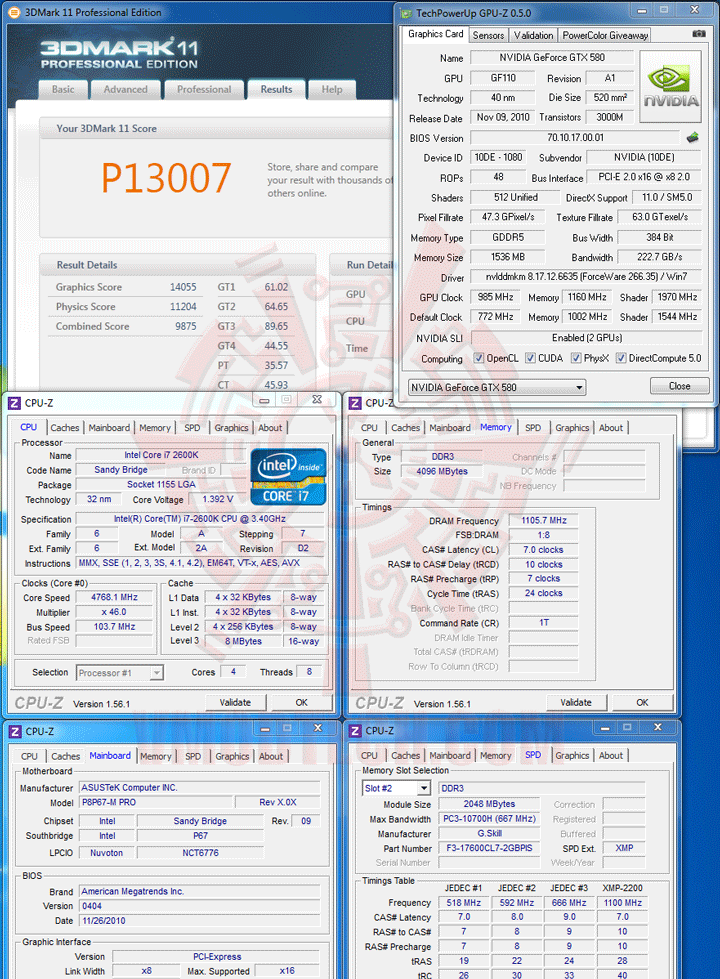
ก็ยังแรงทะลุ 13K กันไปนะครับสำหรับ 3DMark 11
Low VCore Pass LinX but not pass 3DMark 05 CPU Test??
LinX 0.6.4 Problem size 15500 Memory used 1846MB (All of 32-bit OS) 20Loops
(Click ScreenShot to Enlarge)
(Click ScreenShot to Enlarge)
…ของฝากปิดท้ายคราวนี้ก็จะมาแปลกนิดนึงนะครับ คือการทดสอบ LinX ค่า Default มาตรฐาน 20Loops ปรากฏว่าผมลองใช้ VCore ที่ 1.36-1.38V. ก็ผ่าน LinX ไปด้วยดี แต่พอไปเทสต์ 3DMark 05 พอถึงหัวข้อ CPU Test เพียงเท่านั้น เรือกำลังแล่นมาดีๆ จอฟ้ากันไปซะงั้น ต้องเพิ่ม VCore ขึ้นมาอีกจนถึง 1.39-1.41V. เพียงค่าเดียว ก็จะผ่าน CPU Test ของ 3DMark 05 ไปได้ ดังนั้น LinX เวอร์ชันปัจจุบัน 0.6.4 จึงยังไม่ใช่ที่สุดแห่งเสถียรภาพของซีพียูรุ่นใหม่อย่าง Sandy Bridge นะครับ ซึ่งเท่าที่ผมลอง CPU Test ของ 3DMark 05 นี่แหละครับที่หินจริงๆ พอผ่านแล้วถ้าคอนฟิคต่างๆโดยรวมถูกต้องดีพอแล้วล่ะก็ Prime95 OCCT ก็ยังผ่านสบายครับ
Conclusion
...ก็เดินทางมาถึงบทสรุปกันแล้วนะครับ ก็ถือว่าแรงคุ้มค่าคุ้มราคากันไปอีกรุ่นหนึ่งนะครับ สำหรับมาเธอร์บอร์ด ASUS P8P67-M PRO ตัวนี้ อัดกับ Intel Core i7 2600K กันที่ความเร็วสูงถึง 4,768MHz BClk 103.7MHz DDR3-2211 7-10-7-24-1T ก็ยังสามารถเทสต์ผ่านฉลุยทุกการทดสอบและทุกหัวข้อที่โหดๆ ครบถ้วนอย่างไม่หวั่น ซึ่งถ้าหากได้รับการ Update BIOS เป็นตัวล่าสุด ที่มีฟังค์ชัน Internal PLL OverVoltage ขึ้นมาให้ Enable เพื่อเพิ่มความแรงแล้วล่ะก็ คาดว่าการอัดให้ทะลุ 5GHz ก็ไม่น่าจะยากจนเกินไปสำหรับบอร์ดเล็กๆตัวนี้ครับ กับราคาขายที่น่าจะอยู่ที่ประมาณ 4,XXXบาท ผมคิดว่าก็เป็นอีกตัวเลือกหนึ่งที่คุ้มค่าดีนะครับ เพราะว่านอกจากจะโอเวอร์คล็อคได้ดีแล้ว บอร์ดตัวนี้ก็ยังสามารถ SLI ได้อีกต่างหาก ขนาดบอร์ดก็เล็กดี เหมาะสำหรับผู้ที่ต้องการนำไปใส่เคสเล็กๆ แต่อยากได้ประสิทธิภาพในการโอเวอร์คล็อคที่แรงจริงๆครับ และสำหรับวันนี้ผมขอลาไปก่อนแต่เพียงเท่านี้ แล้วพบกันอีกทีในวันพรุ่งนี้ สวัสดีครับ
.



.
ขอขอบคุณ
ASUS


